How to identify and avoid Discord scams


From gaming servers to study groups and work communities, Discord has become a daily communication tool for millions of people. That popularity also makes it a target for scammers. Discord scams are designed to look routine, a free perk, a system alert, a message from a friend, or a trusted bot.
This guide explains the most common Discord scam tactics, why they work, and how to avoid falling for them.
What are Discord scams?
Discord scams are deceptive messages or activities that take place on Discord with the goal of stealing account access, personal information, or money. They often appear as routine server messages, direct messages, or bot notifications, which makes them easy to mistake for legitimate communication.
Rather than relying on technical exploits, most Discord scams use social engineering to pressure users into clicking links, downloading files, or sharing login details.
Most common Discord scams
Below are some of the most widespread scams on Discord.
Phishing scams
Phishing scams are one of the most common threats on Discord. The links typically lead to websites that closely mimic Discord’s login page or a well-known service. Once a user enters their credentials, attackers can take over the account, send scam messages to others, or use the account to spread additional phishing links.
Examples
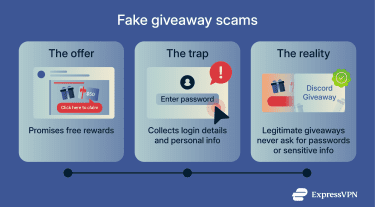
- Fake Nitro and giveaway links: Fake Nitro or giveaway scams promise free subscriptions, gift cards, or prizes, then lure users to links, surveys, or fake login pages.
- Fake crypto / non-fungible token (NFT) giveaways: Scammers promote fake crypto or NFT projects with fabricated charts and stories. They often promote fake or misleading crypto or NFT projects using fabricated claims, charts, or hype, which can result in victims losing money after engaging with the scheme.
- Fake token launches or airdrops: This scam promises to distribute free digital tokens (units of cryptocurrency) to early supporters if they connect wallets or pay small fees.
Red flags to watch for
- Links that imitate Discord branding: Fake login pages may look identical to Discord but use misspelled domains or shortened URLs.
- Promises of free rewards or quick profits: Offers involving free Nitro, crypto gains, or exclusive access are common bait.
Impersonation scams
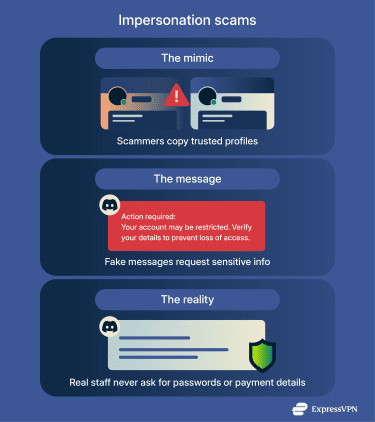
Impersonation scams occur when someone copies an admin, moderator, or friend’s profile. They’ll likely use a similar name and picture to appear trustworthy.
Examples
- “Discord staff” warnings: Fraudsters pose as Discord staff, warning of account risks or rule violations. Then, they ask for login details or send phishing links.
- “Friends” asking for tokens or codes: Scammers impersonate friends to steal tokens, verification codes, or account details, often pretending to help with a server task or issue.
- Cloned accounts/bots: Fake accounts copy the name and profile of real users or bots to appear trustworthy.
Red flags to watch for
- Unexpected messages from “staff”: Discord employees don’t contact users through direct messages about account issues or rule violations.
- Small changes in usernames or avatars: Impersonators often use look-alike names, extra characters, or copied profile pictures.
- Asking for tokens or codes: No legitimate admin, bot, or friend needs your Discord token or verification codes.
- Out-of-character behavior: If a friend unexpectedly requests sensitive information or shares links without context, verify the request through another channel first.
Malware scams
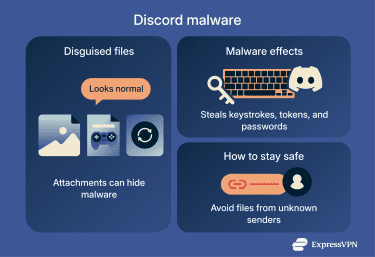
Human con artists or bots may send files or links that seem legitimate. Opening these files or clicking these links can install Discord malware that records keystrokes, steals your Discord token, or collects credentials.
Examples
- Fake tools and updates: These are seemingly useful files like game mods, software updates, bots, or helper scripts that contain malware.
- Images or videos: Impersonators may send media files or archives that appear harmless but actually contain malicious executables or scripts.
Red flags to watch for
- Unexpected file attachments: Random images, mods, or tools sent without explanation should be avoided.
- Unusual file types: A screenshot or video with an unusual file extension like ZIP or RAR might contain an infected executable file.
- Bots sending external links: Legitimate bots generally don’t require you to download executable files or software from external sites to function.
Other Discord scams
Paid role or server access scams
In these scams, users are told they must pay a fee to join a Discord server or unlock special roles, private channels, or “VIP” access. The request may come through a direct message, a public server post, or a fake bot message made to look official. Payment is often requested via cryptocurrency, gift cards, or third-party payment apps. Once payment is sent, access is never granted, or the scammer disappears.
Legitimate Discord servers rarely require payment through direct messages, and official paid communities typically handle access through external, verifiable platforms rather than ad-hoc requests.
Cash-flip schemes
A form of crypto and investment scams, cash-flip and money-doubling schemes promise to multiply cryptocurrency or other digital payments if a user sends funds first. Messages may claim the sender has a proven method, insider access, or automation that can “flip” small amounts into larger returns. In reality, no funds are ever returned, and once payment is sent, it cannot be reversed.
Any request to send money upfront in exchange for guaranteed returns is a strong warning sign.
How to protect your Discord account
Follow these steps to help secure your account:
- Enable two-factor authentication (2FA): This adds an extra step when you log in. After entering your password, you must provide a code from an authentication app or through an SMS message (texts to your phone).
- Block direct messages from strangers: This tip greatly reduces phishing, but keep in mind that scams can still come from hacked friends or trusted servers.
- Filter messages: To reduce the chance of scams, spam, or harmful content reaching you on Discord, you can tighten your message filter settings beyond the default option. By default, Discord filters direct messages from non-friends, but you can switch to the most restrictive setting, which applies message filtering to all direct messages.
- Limit who can add you as a friend: This restricts Discord friend requests to people you know or share servers with, lowering the risk of adding fake accounts.
- Avoid scanning unknown QR codes: QR code login scams on Discord exploit the platform’s legitimate QR-based sign-in feature to hijack accounts. To reduce the risk, never scan any QR codes you did not generate yourself.
Protecting your server and moderators
Server owners should secure their community by giving moderators the right tools and permissions.
- Role-based permissions: Control what members and moderators can do by limiting access to certain actions, like the ability to post links, send mass messages, or manage channels.
- Verification levels: Require new members to meet certain criteria before they can post or send messages.
- Server-wide 2FA: This helps protect your Discord server from account takeovers by ensuring that moderators and administrators must use an extra verification step before performing sensitive actions. This reduces the risk that a compromised admin account can be used to delete messages, change settings, or add malicious bots.
- Explicit image filter: Automatically scan and block inappropriate images shared in the server.
Use a VPN to protect your identity and network
A virtual private network (VPN) helps protect privacy at the network level by masking your public IP address and encrypting traffic between your device and the VPN server. This hides your approximate location and makes it harder for others to use your real IP address for targeted harassment or direct network attacks.
How a VPN prevents Discord tracking and IP-based attacks
When you connect to Discord, its infrastructure can see your IP address, and so can external sites you open through links. With a VPN enabled, they see the VPN server’s IP instead of your real one.
As a result, attempts to collect your IP address reveal the VPN’s IP instead of your real one, which reduces the risk of IP-based doxxing. IP-based denial-of-service (DoS) attacks are also directed at the VPN connection rather than your home network, making it harder to directly disrupt your internet connection.
What to do if you’re scammed on Discord
If you believe you’ve been scammed on Discord, act quickly to limit further damage. Start by securing your account: change your Discord password immediately, enable 2FA if it isn’t already on, and log out of all active sessions.
Securing your account
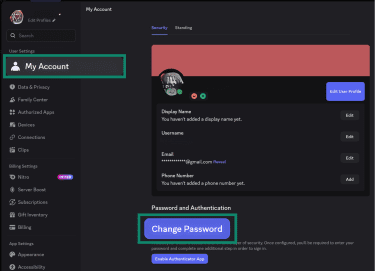
- Change your Discord password: Go to User Settings > My Account > Change Password. Be sure to create a strong, unique password that you’ve never used before.
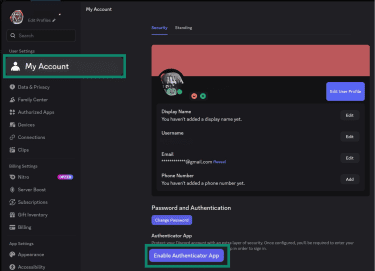
- Enable 2FA: Download an authenticator app (Discord recommends Authy or Microsoft Authenticator). In My Account, click Enable Authenticator App and connect the app to your account by scanning the QR code.
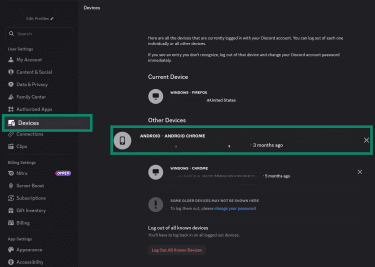
- Revoke active Discord sessions: In User Settings, go to Devices and remove any sessions you don’t recognize to block unauthorized access.
Learn more: Read our step-by-step guide on what to do if you believe your Discord account was hacked.
Reporting to Discord
Next, report the incident to Discord using the in-app reporting tools or reporting form. Reporting helps Discord investigate the account, bot, or server involved and can prevent the scam from spreading to others.
You should also block the scammer and avoid continuing the conversation, even if they claim they can “fix” the situation.
Contact your payment provider
If money, cryptocurrency, or sensitive personal information was involved, contact your payment provider or bank as soon as possible to ask about potential recovery options and to flag the transaction as fraudulent.
In cases of identity theft or significant financial loss, consider filing a report with your local consumer protection agency or cybercrime reporting body. In the U.S., these are the Federal Trade Commission (FTC) and the FBI’s Internet Crime Complaint Center (IC3).
FAQ: Common questions about Discord scams
Is it safe to accept a DM from a stranger?
Accepting a direct message from a stranger is usually unsafe. Strangers can send fake offers, harmful links, or messages designed to create pressure. You can stay safer by limiting who can message you and by ignoring unexpected requests.
How do I report a scammer to Discord?
You can report a scammer through Discord’s official reporting system. Start by collecting screenshots or links that show the scam attempt. Then, use the report form on the Discord support site to submit the details.
What are the top red flags in a Discord server?
The biggest warning signs in a server include poor moderation, strange links, and sudden promises of rewards. Be cautious of servers with channels that push repeated promotions or urgent requests. Servers that allow new users to post links or send mass messages also present risks. Leaving early helps you avoid harmful content.
Take the first step to protect yourself online. Try ExpressVPN risk-free.
Get ExpressVPN