How to change location on Bumble


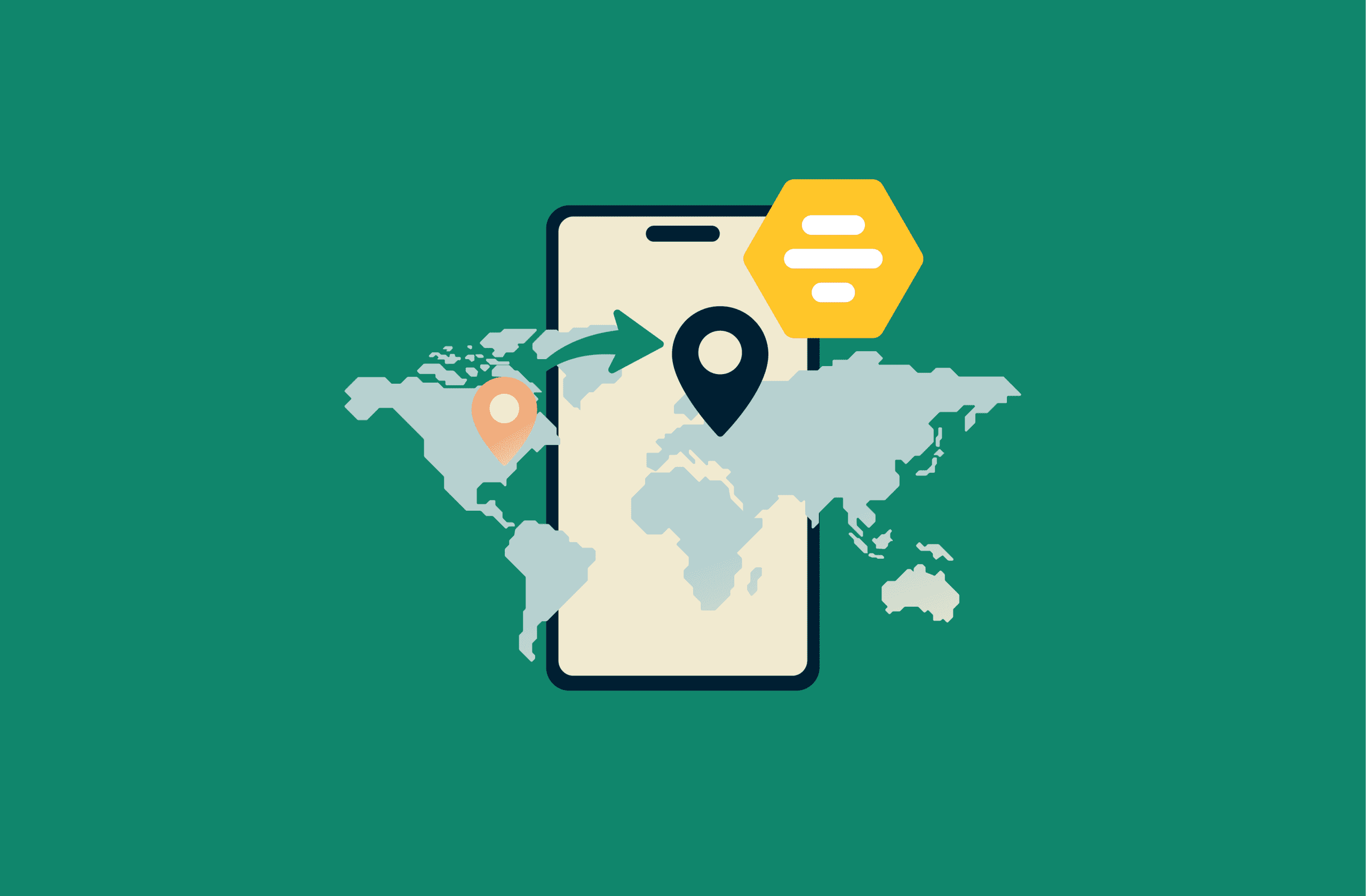
Bumble Premium’s Travel Mode lets you place your profile in any city it supports worldwide. It’s the only supported way to change your location on Bumble virtually.
This guide explains how Bumble detects and uses your location data, how Travel Mode works, and how to troubleshoot common location issues. We also cover privacy settings and visibility controls to help you maintain control over what you share as you connect with others.
How to change your Bumble location with Travel Mode
Travel Mode is the best and easiest way to change your location without physically moving, and it’s available with a Bumble Premium or Premium+ subscription.
How to activate Travel Mode
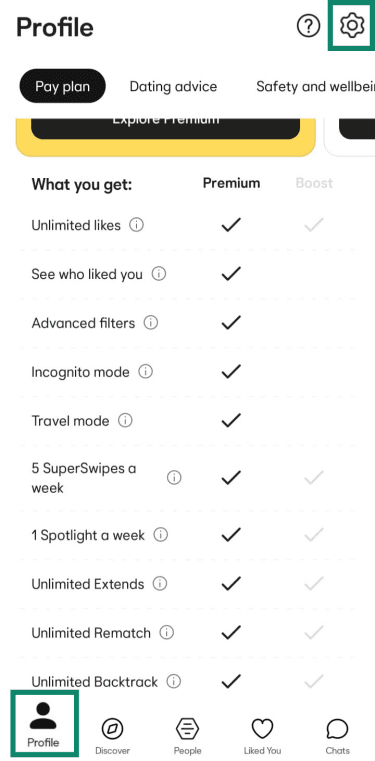
- Tap the gray Profile icon in the bottom left corner of the Bumble app and then the gear icon in the top right corner to open your Settings.
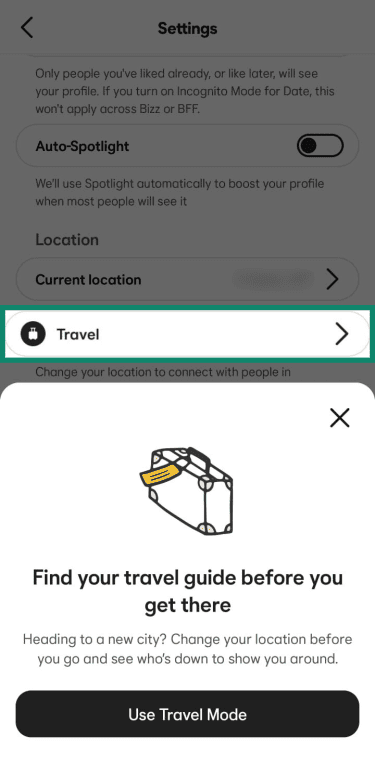
- Scroll down to the Travel section and tap Use Travel Mode.
- Search for the city you want and select it.
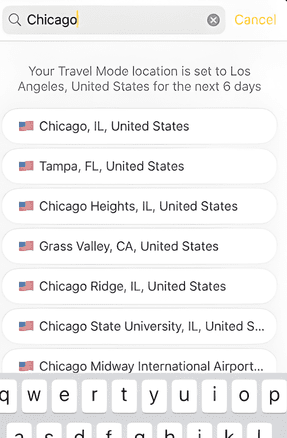
- Your profile will now appear in that city's swipe deck for the next seven days.
Cities you can choose
You can pick any city where Bumble is available. However, you can't pick a specific street or neighborhood; instead, you'll be positioned in a central point Bumble chooses in the city.
For example, if you choose to travel to London, Bumble places your profile pin in the center of the city based on its mapping data. If your distance preference is set to 10 miles, you’ll see and be seen by users within a 10-mile radius of that central London point.
Limitations and visibility
When you use Travel Mode, Bumble adds a Traveler badge to your profile to tell other users that you aren't a local. In addition, you can change cities as often as you want, but you can only be in one at a time.
How Bumble detects and uses your location
To provide matches, Bumble requires location data. The app uses a combination of hardware and software signals to identify your position.
GPS, Wi-Fi, and device-based location tracking
Bumble shows you nearby matches based on the location your phone reports. When you allow the Bumble app to access your location, it primarily relies on your phone’s GPS. To fine-tune that position, it may also factor in nearby Wi-Fi networks and mobile signals. In places where GPS struggles, like dense city centers or indoors, these extra signals help improve accuracy.
Can you hide your location?
There's no setting in Bumble that lets you hide your location specifically. That said, there are ways to hide your profile when you’re not actively swiping. We go into more detail below.
Is location tracking active when the app is closed?
Bumble’s location updates depend on your permission settings. If you allow location access only while the app is open, Bumble stops receiving GPS data when you close it. Until you reopen the app, your profile may still appear to others using your last known location.
Bonus methods and app settings
While Travel Mode is the primary way to change your location, you can manage how Bumble sees and shows your position through other built-in tools.
Adjust location permission settings
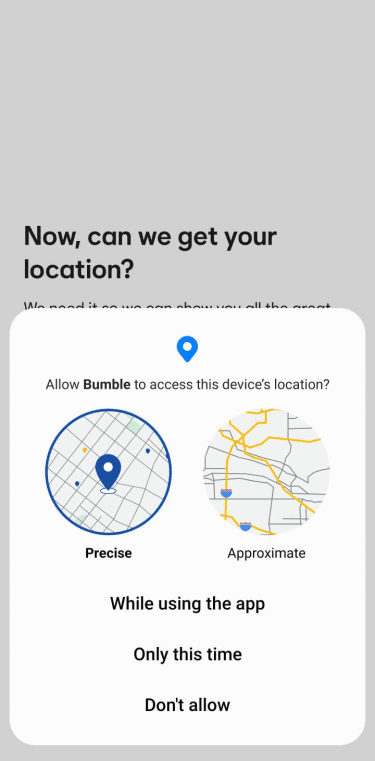
When you first install Bumble, your phone’s operating system asks you to choose how to share your location. This isn’t a setting within the Bumble app itself. It’s a privacy control managed by your device. You’ll see three choices that dictate how and when the app sees your location:
- While using the app: Bumble only accesses your coordinates when the app is open. Closing it stops data sharing immediately.
- Allow all the time: This lets Bumble track you even when the app is closed. We advise against this for online dating apps, as it shares more data than necessary.
- Deny: Bumble won’t work. The app relies on location to find people nearby, so you won’t see potential matches.
Adjust distance preferences in Bumble
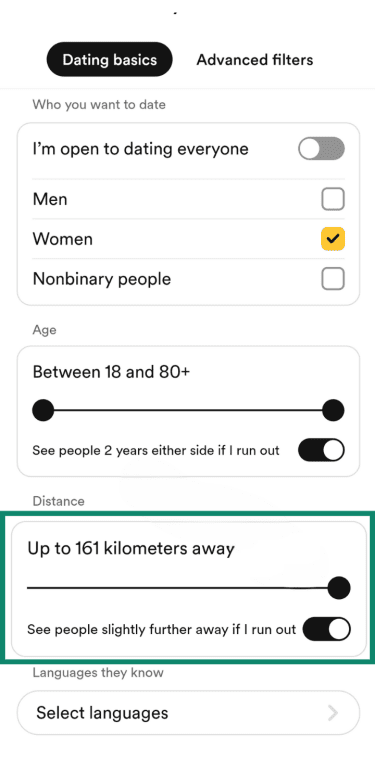
If you prefer not to subscribe to Premium or Premium+, you can broaden your search radius. While this doesn't move your profile location, it lets you see people who are much further away than your immediate neighborhood.
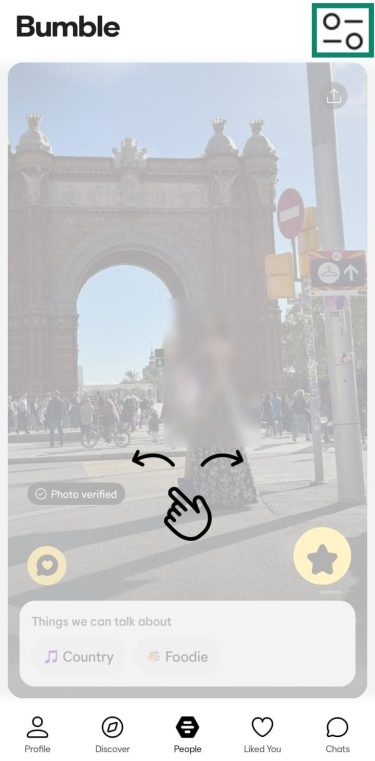
- Tap the filter icon on the main swiping screen.
- Find the Distance slider and move it to the right to see matches up to 100 miles (161 kilometers) away.
Use Snooze Mode to pause location updates
You can activate Snooze Mode in Bumble settings to pause your profile visibility and hide your location during breaks. Your profile stops appearing in the swipe queue, but your existing matches and chats stay available while Snooze is on. To turn it on:
- Open Bumble, tap your Profile icon, and then tap the Settings icon.
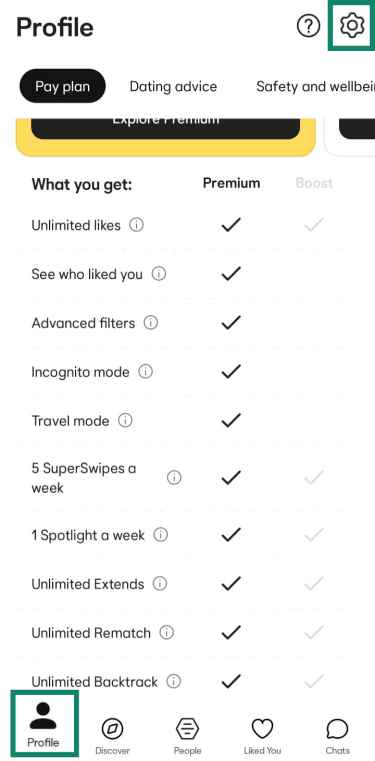
- Select Snooze Mode and choose how long to snooze (24 hours, 72 hours, a week, or “Until I change it”).
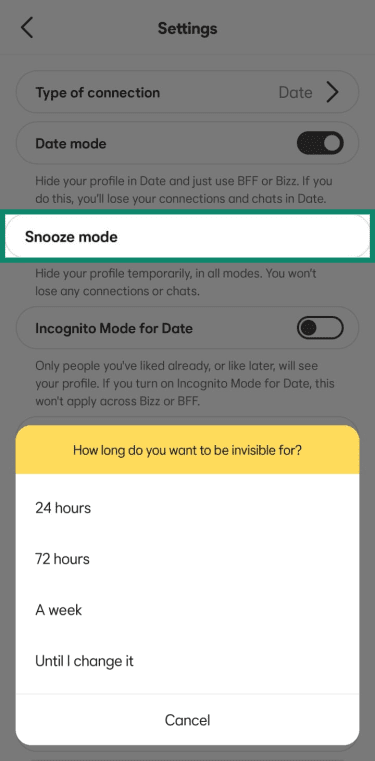
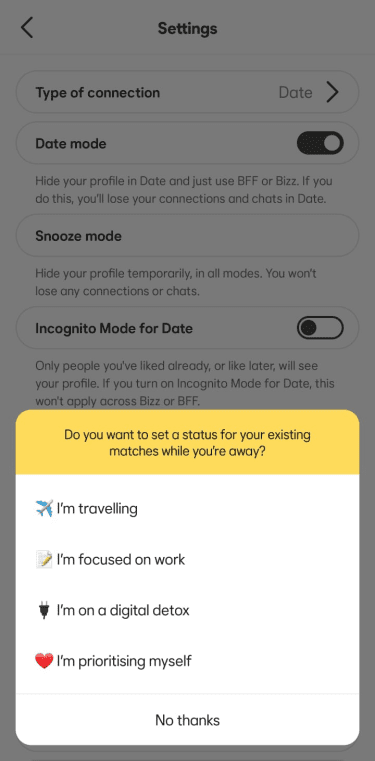
- Pick a status to show matches or select No thanks to skip this step.
If you’ve met someone or are finished with the app, you can delete your Bumble account for a permanent solution.
Activate Incognito Mode
Bumble Premium's Incognito Mode hides your profile from all users unless you like them first, so you can browse without exposing your profile and location to others. You can switch Incognito Mode on or off by following these steps:
- Tap on your Profile icon and then the Settings icon.
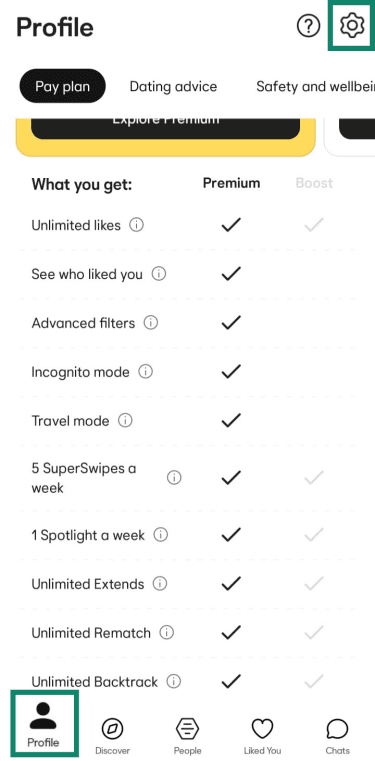
- Look for Incognito Mode and switch it on.
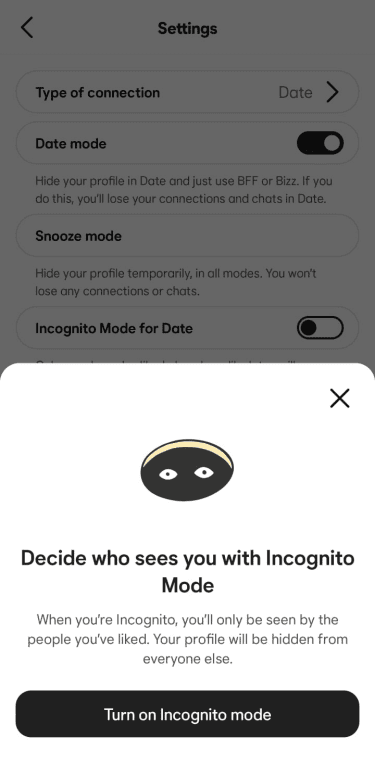
To turn it off, just tap the switch again.
Request manual location change
If your GPS is permanently showing you in the wrong city, you can ask Bumble support for a manual fix. This isn't for temporary travel, but it helps if your device is consistently giving incorrect data.
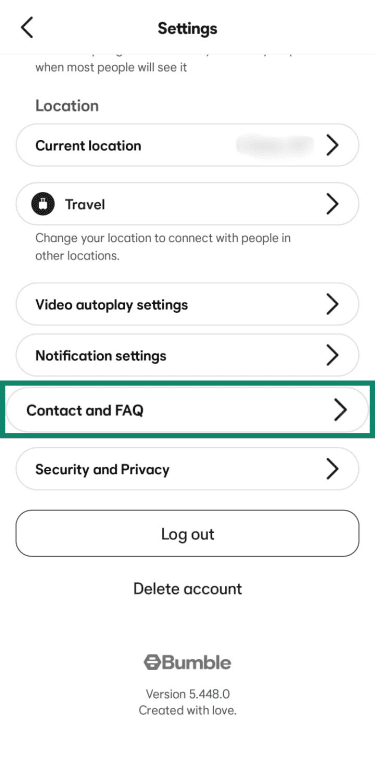
- Tap Contact and FAQ in your profile settings.
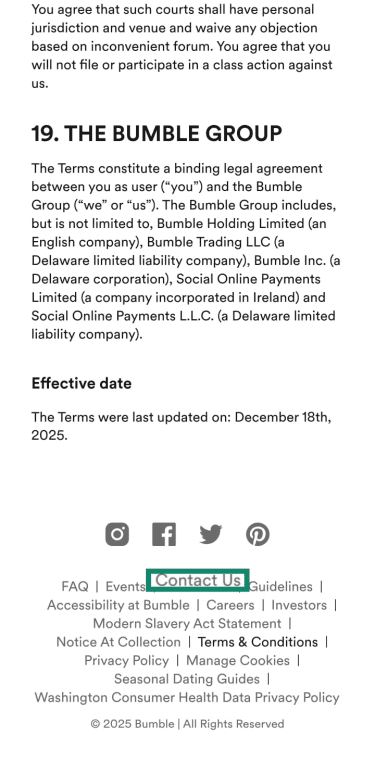
- Select Terms of Service and scroll down to the bottom and tap Contact Us.
- Tap Report a technical issue. Explain the situation and provide your details and the correct city. Tap Submit.
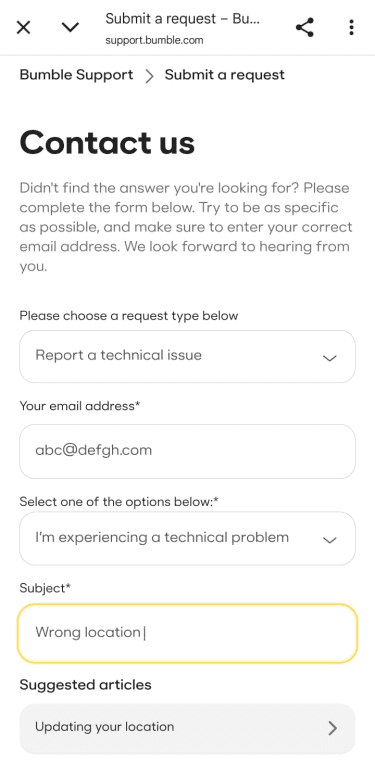
Bumble may be able to override your device data to ensure your profile stays in the right place.
Common problems and solutions
Sometimes your location settings won't work as expected. Most of these issues stem from your device settings or network connection.
Bumble shows the wrong location
If the app thinks you're in a city you've never visited, your device may be receiving bad data.
- Location access: Make sure location access is toggled for the Bumble app in your device settings.
- Turn off your virtual private network (VPN): A VPN changes your IP address, which can confuse Bumble if it's looking for a secondary location signal.
- Switch to mobile data: Public Wi-Fi networks sometimes route traffic through a server in a different city.
- Update your app: Old versions of the app may contain bugs that affect location updates.
If the problem persists, try switching your phone on and off.
VPN or spoofing doesn’t work
Using a VPN or a third-party GPS spoofing app often fails on Bumble. VPNs change your IP address, but they don’t affect GPS data, which Bumble primarily relies on to detect your location.
The app may also detect GPS spoofing. If Bumble detects you’re using a fake location, it may freeze your profile or stop showing you new matches. Since using a tool to spoof your location could be viewed as misrepresentation under Bumble’s Community Guidelines, using Travel Mode is the only reliable way to change your city.
Location keeps resetting
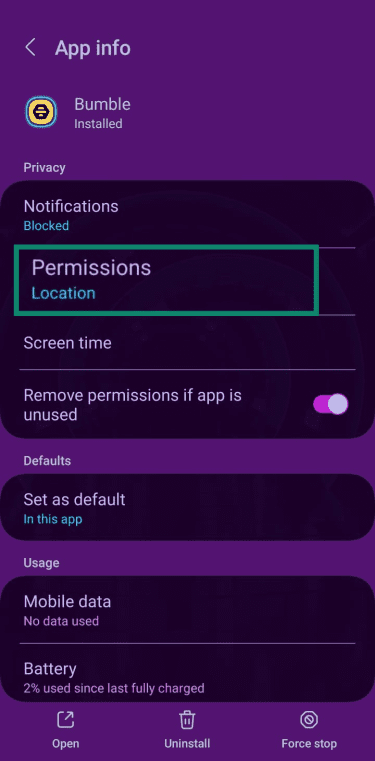
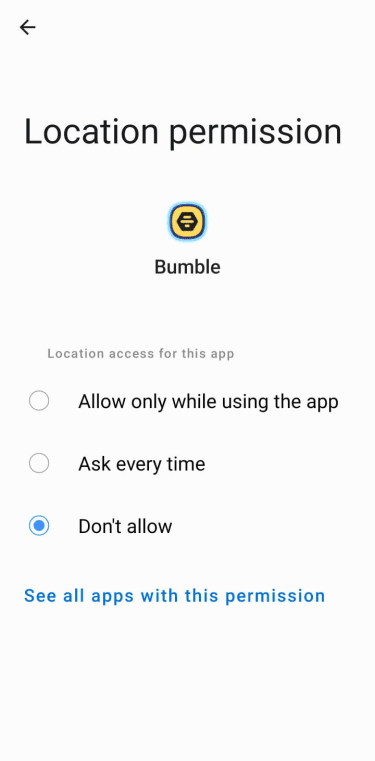
If your profile jumps back to your old home after you've moved, you might need to refresh your device location permissions. The guide below is illustrated with Android, but similar steps apply for iOS.
- Go to your phone settings, find Apps, and look for Bumble.
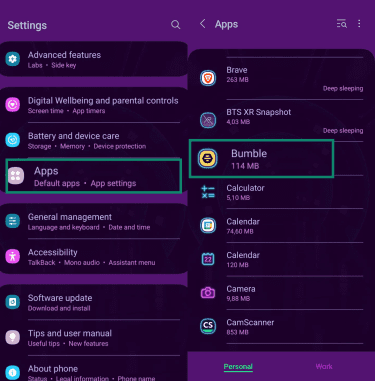
- Toggle location access under Permissions (on iOS, select Location).
- Set it to Don’t allow and then back to Allow only while using the app.
- Restart your phone to clear any old data that's stuck in the system.
You’re not seeing local matches
When you use Travel Mode and then return home, your profile might stay in the other city for a short time. Ensure you've turned off Travel Mode in your settings so Bumble knows to look for your real GPS signal again.
Safety and privacy tips
Protecting your digital privacy is essential when using Bumble (or any dating app), especially if you’re connecting with people in new locations. Managing what personal information you share and how you interact on the app helps reduce unwanted attention and keeps your experience secure.
Here are a few ways to keep control over your information and interactions so Bumble remains a safe app for you:
- Look for the blue checkmark: Always prioritize matches who have completed photo verification to ensure you are talking to a real person.
- Limit personal details in your profile: Avoid sharing sensitive information such as your full name, workplace, or frequent locations to reduce your digital footprint.
- Keep your contact details private: Use the in-app voice call and video chat features to get to know someone without sharing your phone number or social media handles.
- Be cautious with photos: Remove metadata and avoid sharing images that reveal identifiable personal details or your home environment.
- Block and report: If a match makes you feel uncomfortable or unsafe, use the Block and Report tool to remove them from your view and notify the Bumble safety team.
FAQ: Common questions about changing your location on Bumble
Can I use Bumble in another country?
Bumble works across most countries, so your profile updates automatically when you cross a border and open the app. If you travel frequently, upgrading to Bumble Premium might be worth it. It allows you to use Travel Mode to swipe in a new destination before you leave home, helping you build a social circle in advance.
Can I change my location without paying?
You can’t manually set a new city on Bumble without using a premium plan. However, new users are frequently offered a 14-day trial of its premium features; just look for the in-app prompt.
Will Bumble notify others when I change my location?
Bumble never sends a notification to your matches when you move to a new area. But, if you use Travel Mode, a Traveler badge appears on your profile to let others know you aren't a local. If you move physically, your distance from other users will simply change on their screens the next time they view your profile.
How many times can I change location?
With a Bumble Premium subscription, you have the freedom to change your city as many times as you like. Each time you select a new destination, your profile stays there for seven days unless you choose to move elsewhere sooner. You can only be active in one city at a time, but there are no limits on total changes.
Take the first step to protect yourself online. Try ExpressVPN risk-free.
Get ExpressVPN