Recognizing and avoiding Steam card scams



Steam gift cards are meant to be a quick, no‑hassle way to add funds to your account or give someone a present. Unfortunately, scammers have learned to exploit that trust. From fake giveaways and impersonation messages to urgent payment demands, scams involving gift cards are now among the most commonly reported ways people lose money online.
This guide explains how Steam card scams work, the warning signs to look out for, and the tactics scammers use to pressure victims into acting fast. You’ll also learn what to do if you’ve already been targeted and how to protect yourself going forward.
What are Steam cards, and how are they used?
Steam cards are prepaid cards that are sold online and in physical stores and have a fixed monetary value. Once redeemed, the value is converted into the Steam wallet balance tied to that specific account.
Steam gift cards are designed to be used only within the Steam ecosystem. After redemption, the funds can be spent on games, downloadable content (DLC), in-game purchases, and other items available on Steam. However, Steam wallet funds can’t be transferred back to cash, withdrawn to a bank account, or moved between Steam accounts.
What are Steam card scams?
Steam card scams involve criminals tricking people into buying Steam wallet gift cards and sharing the redemption codes. Because these cards act like digital cash on Steam, scammers pressure victims to quickly provide the codes, knowing that once redeemed, the funds transfer instantly and can’t be reversed, causing permanent loss to the victim.
Types of Steam card scams
These scams follow a few common patterns, despite varied stories or excuses:
- Fake Steam support scams: Scammers pose as Steam or Valve (the company that created Steam) representatives, claiming issues with your account. Victims are told to buy gift cards to fix problems or avoid restrictions, then share the codes.
- Tech support payment scams: Fraudsters offer technical support but demand payment exclusively via Steam cards.
- Impersonation scams: Scammers claim to represent law enforcement, tax agencies, or employers. They pressure victims to pay supposed fines, fees, or penalties using Steam gift cards and ask for personal details used in identity checks, like answers to security questions.
- Online marketplace or transaction scams: Scammers posing as buyers or sellers insist on Steam cards as payment.
- Prize, fee, or payment request scams: Victims are told they’ve won a prize or must pay a fee to receive money or complete a process.
How gift card scamming works
The scam usually starts with unsolicited contact from someone pretending to be an authority figure. They claim there’s an urgent problem with the victim’s account that must be resolved immediately.
A fake issue is presented, such as an investigation, restriction, or pending ban, with pressure to act quickly, discouraging victims from verifying the claim.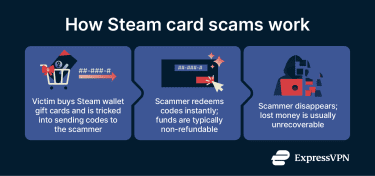
How to spot Steam card scams
Warning signs of a scam
Here are common signs of Steam gift card scams:
- Someone contacts you via Steam, Discord, or another chat app, claiming your account has been falsely reported.
- You are directed to use online chat to resolve an investigation or pending ban.
- Someone requests your account credentials or asks you to perform security-related actions.
- You receive requests for authentication codes sent by Steam via email, SMS, or the mobile app.
- A person claims to represent Steam Support or Valve.
- Someone demands that you complete a purchase or send Steam Gift card codes to verify account ownership.
Additional signs include:
- The contact comes through the Friends network or another chat app.
- You receive links that lead outside official Steam websites.
- Your Steam profile is suddenly altered to display warnings or ban threats.
- Any claim that you’ve been reported for fraud.
How to verify if a Steam message or request is legitimate
Steam scams often look convincing because they borrow real branding, real terminology, and familiar account-security language. The safest way to avoid falling for them is to verify the message itself before interacting.
- Check where the request came from: Official Steam support messages usually appear at Steam Helpdesk, where you can check real account alerts, support tickets, and security notifications.
- Inspect the request: Steam will never ask you to buy or share Steam card codes or send screenshots of purchase history and card numbers. Neither will it ask you to pay for verifying, unlocking, or securing your account.
- Search the message text online: Copy-paste the message into a search engine. Scam scripts are reused, and you’ll often find forum posts or warnings quoting the same text.
- Slow the process down on purpose: Scammers invent a problem so you can rush to “fix it”. If a message is pressuring you to act quickly, it’s a common sign of a scam.
- Other signs: If a deal sounds too good to be true, it probably is. Also, look out for odd phrasing like spelling errors, unusual sentence structures, or language that doesn’t match the sender’s profile.
What to do if you’ve been scammed
If you become a victim of a Steam card scam, taking swift action may help limit further issues. While this information offers general guidance, it does not constitute legal or financial advice.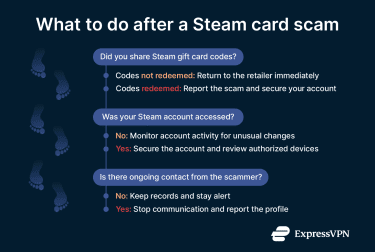
Immediate actions to take
If your Steam account has been compromised, the first step is to contain any potential threats by running a thorough malware scan on your device. This scan can help detect viruses, spyware, or keyloggers. Additionally, securing your email accounts, especially those linked to your Steam profile, is important to prevent unauthorized access.
Learn more: Find out how to spot possible signs of malware.
It is crucial to keep all relevant evidence related to the scam, including the physical Steam gift cards and purchase receipts. In cases where the cards were activated but not redeemed, contacting the retailer to inquire about refund or cancellation options may be possible.
Reporting the scam to Steam
If you still have access to your account, you can report the profile that’s trying to scam you through Steam’s built-in reporting feature:
- Right-click the scammer’s profile that messaged you and choose View Profile. This will take you to that profile’s page.
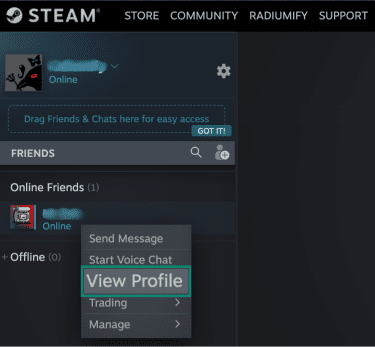
- Click More, then Report Player.

- In the window that opens, under Please tell us why you’re reporting this person, select They are involved in theft, scamming, fraud, or other malicious activity.
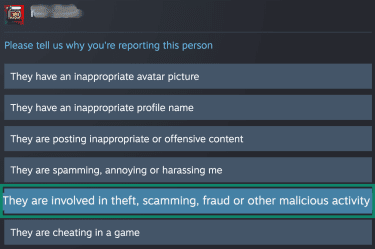
- Select They are engaged in item theft or scamming.
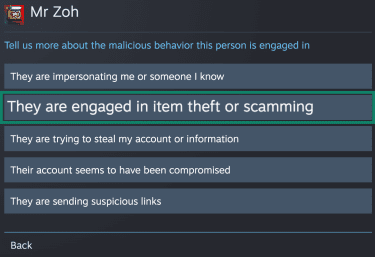
- In the next window, click Submit this account for review and provide all the details in the text box that opens up. Once done, click Submit Report.

Reporting a scammer directly from their Steam profile is more effective than submitting a Steam Support ticket, but if you still want to submit a ticket, include the following:
- Steam profile link and SteamID of the scammer.
- Screenshots of the scam interaction.
- Exact date and time of the scam attempt.
- Complete description of what happened, including the trade request, phishing site, and Steam card codes provided.
Note that reporting a profile won’t necessarily ban the user. Steam uses these reports to help identify and address new scamming trends.
Note: If the scammer contacted you using any non-Steam accounts, the reporting tools provided by those platforms may be used to help identify the scammer’s accounts and prevent further misuse.
Reporting the scam to the authorities
If a payment was made to a scammer using a gift card, a report can be submitted to the Federal Trade Commission (FTC) via the Report Fraud form. The FTC accepts reports even if no money was lost, but there is suspicion of fraudulent activity.
How to protect your account after a scam
Start by resetting your Steam account password to secure access. This can be done by logging into your Steam profile, selecting your username at the top right, then navigating to Account Details > Security & Devices > Change password.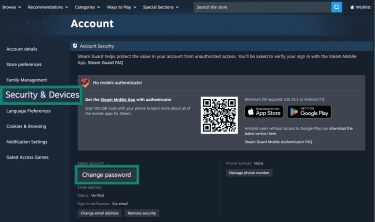
Learn more: Read our detailed guide on how to reset your Steam password.
Reviewing the Authorized Devices section is recommended to ensure that only familiar devices are listed. If any unrecognized devices are present, the option to Sign out everywhere logs the account out of all devices.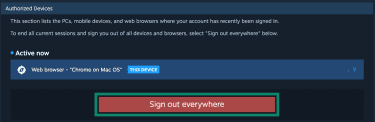
Next, enable two-factor authentication (2FA). Steam uses a built-in system called Steam Guard, which is enabled by default (once your email is verified and you’ve restarted Steam twice afterward) and sends a verification code when signing in from a new device.
Additional protection is available through the Steam Guard Mobile Authenticator. Once enabled, the app adds extra protection by requiring QR login, a confirmation notification, or a time-limited code during sign-in.
For other accounts you use outside Steam, adopting phishing-resistant MFA can further reduce the risk of fake login pages stealing authentication codes.
Learn more: Read our guides on safe cloud gaming and best DNS servers for gaming.
Recovery options
Assessing financial and account damage
To check for financial loss, log into your Steam account, click your username on the top right, then Account details. Under the Account details tab, click View purchase history. You’ll see the list of transactions on your Steam wallet and can identify suspicious ones.
You can also check for unauthorized trades. Click on your username from the menu bar, then Inventory. In the page that opens, click More… and choose one of the following options: View Trade History, View Inventory History, and View Gift History.
Can you recover Steam card funds?
Once a Steam gift card code has been redeemed, the funds are permanently tied to that account and can’t be transferred or refunded through Steam.
If you haven’t yet provided a scammer with the code or a physical Steam gift card, and the code hasn’t been redeemed, you may be able to get a refund or cancellation through the retailer where it was purchased, depending on their policies.
Steam Support may assist with certain gift card issues, such as damaged or unreadable codes before redemption and can also help with account recovery or suspicious activity related to scams. However, Steam generally doesn’t restore funds or items once gift card codes have been redeemed and spent.
Here are situations where receiving a refund is possible:
- Steam wallet funds: Funds purchased on Steam can be refunded within 14 days if none of the funds have been used.
- Games and software on Steam: Refunds are available within 14 days of purchase if playtime is under 2 hours. This applies to games and DLC purchased directly from the Steam store.
- In-game purchases: Valve-developed games allow refunds within 48 hours if the item has not been used, modified, or transferred. For non-Valve games, refunds depend on whether the developer has enabled this option.
- Titles purchased before release: The 2-hour playtime limit applies immediately, except during beta testing. For titles not playable before release, you may request a refund at any time before release, and the standard 14-day/2-hour window starts on release day.
- Renewable subscriptions: Refunds are available within 48 hours if the subscription has not been used during the current cycle. Usage includes playing games or using benefits tied to the subscription.
- Gifts: Unclaimed gifts can be refunded if they meet Steam’s 14-day purchase window and 2-hour playtime limit. Accepted gifts may also be refunded under the same conditions if the recipient initiates the refund.
Purchases made outside of Steam, such as CD keys or Steam wallet cards bought from third parties, are not eligible for refunds through Steam. Additionally, you lose eligibility for refunds on games if you have been banned by the Valve Anti-Cheat system (VAC).
Some games support Trade Protection, which allows you to reverse recent trades within 7 days if you lost items after losing control of your account. Items under Trade Protection can’t be consumed, modified, or transferred during this period and cannot be reversed after 7 days.
Avoiding fake “recovery services”
After a scam, offers may appear promising to recover lost money or Steam funds for a fee. These so-called recovery services often target victims and claim they can retrieve funds if paid upfront. However, payments to such services typically result in further financial loss.
FAQ: Common questions about Steam card scams
How do Steam card scammers operate?
Steam card scammers impersonate trusted sources, claiming urgent account problems that require buying Steam wallet gift cards. They pressure victims to quickly share the codes, which scammers redeem instantly. Once redeemed, the funds are gone and typically cannot be recovered.
Why do strangers ask for Steam cards online?
Strangers ask for Steam cards online because scammers use them like digital cash. They pressure people to buy and share gift card codes, which scammers redeem instantly to steal money that can’t be reversed or traced.
What are the red flags of a scammer?
Claims that your account was accidentally or falsely reported are a common warning sign. Demands to buy or send Steam gift cards, requests for passwords or Steam Guard codes, and unsolicited messages claiming to be from support outside official channels are also red flags.
How do I know if someone I’m chatting with is a scammer?
There are ways to verify if a Steam message or request is legitimate. For instance, messages claiming to represent Steam Support through chat apps or friend messages should be treated as suspicious. Legitimate support interactions don’t ask for passwords or Steam Guard codes, and they don’t direct users away from official Steam websites.
What should I do if I suspect a scam?
You should act immediately if you suspect a scam. Don’t follow any instructions or complete any requested purchases. Avoid entering your login details on unfamiliar or unofficial websites, and report the account using Steam’s built-in reporting tools so it can be reviewed.
Can I recover money after a Steam card scam?
Once a Steam gift card code has been redeemed by a scammer, the funds are permanently tied to their Steam account and can’t be recovered or transferred. If the code hasn’t been used yet, you might be able to get a refund through the retailer where the card was purchased, depending on their policies. Steam Support generally doesn’t restore funds lost to scams after redemption.
Can I report a Steam gift card scam?
Yes, Steam allows you to report gift card scams through their platform. You can report the scammer’s profile directly via Steam’s built-in reporting features. Additionally, incidents can be reported to relevant authorities such as the Federal Trade Commission (FTC) and to any external chat or email services the scammer used.
Take the first step to protect yourself online. Try ExpressVPN risk-free.
Get ExpressVPN