Chase fraud alert email: How to identify and respond to phishing


Chase regularly contacts clients by email for various reasons. The trouble is that scammers actively imitate the company, sending messages meant to trick targets into clicking links or sharing sensitive information.
This guide explains how Chase fraud alerts and look-alike messages typically work, how scammers reproduce them, and how to distinguish a legitimate one from a fake. We also cover factors often overlooked, like the difference between a sender’s display name and the real email address, reply-to mismatches, and why visual cues alone aren’t enough.
What is a Chase fraud alert email?
A Chase fraud alert email is a notice that the bank has detected unusual or potentially unauthorized activity. This could include suspicious transactions, account changes, or other security-related events.
Legitimate alerts are designed to inform customers and direct them to secure ways of reviewing their accounts. Chase states that it won't ask for confidential information, such as your username, account password, PIN, or other account information via email or text message.
However, Chase notes that it might ask for certain information to verify your identity if you contact the bank’s official phone support, for example, when you call about an account issue. To avoid scam messages that provide fake "Chase" numbers, it's safest to use contact details found directly on Chase's official website or in the Chase app, rather than any number that might be included in an email or text.
How scammers impersonate Chase
Scammers impersonate Chase in several ways, but phishing emails are one of the most common tactics because they can look convincingly “official” and push users to act quickly. Understanding how these emails are designed helps users spot red flags before they click or share information.
- Branding and layout: Logos, colors, formatting, and even legal footers from real Chase emails may be replicated to make messages look authentic.
- Language and tone: Many phishing messages borrow wording commonly used by banks, referencing account activity, security reviews, or prompts to "verify" information.
- Sender deception: Some campaigns spoof sender details so a message appears to come from a trusted source or use look-alike addresses or domains that resemble legitimate Chase domains.
Why Chase customers are common targets
JPMorganChase reported in 2024 that its Consumer and Community Banking served over 84 million consumers and 7 million small business clients. This wide customer base and brand recognition can be abused by scammers at scale. When scammers send large volumes of emails, at least some recipients are likely to bank with Chase and potentially fall for the scam.
Banks also play a central role in everyday activity. Many people are accustomed to reviewing transactions, confirming payments, or responding to account notices through their bank, which makes messages that appear to come from a financial institution feel routine rather than suspicious.
How to recognize a fake Chase fraud alert email
Identifying fake bank emails often involves spotting one or more red flags. Sometimes a single giveaway, like a suspicious sender address, is enough, but checking for multiple warning signs can help confirm it's a scam.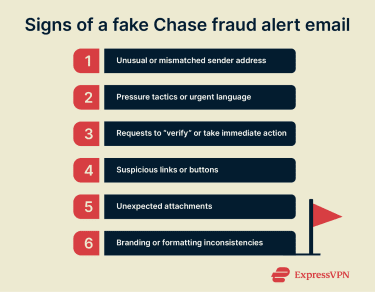
Red flags in the sender address
Scammers can easily change the sender name shown in an inbox, so this signal shouldn’t be trusted on its own. Reviewing the full email address gives more useful information.
Phishing messages often claim to come from Chase but use public email services, unfamiliar domains, or misspelled addresses. Comparing the sender’s domain with Chase's official domains can help spot obvious mismatches, but a familiar-looking address still isn’t proof that the message is legitimate.
Some scams also use spoofing to make messages appear legitimate even though they originate elsewhere. Because of this, checking additional details such as the reply-to address adds context (though even this is no guarantee).
When the reply-to field differs from the sender, scammers may redirect replies to accounts they control, often to continue the conversation, coax sensitive information, or steer a victim toward a fraudulent next step.
Subject line warning signs
Urgent language is common in phishing campaigns because it encourages quick action without careful checks. References to account closures, locked access, or immediate verification are frequently included in fake alerts.
Subject lines that contain unusual capitalization or grammatical errors are likewise suspicious, especially when paired with links or phone numbers, though polished scams may avoid obvious mistakes.
Manipulative message content
Most phishing messages follow a similar pattern. They describe a problem, such as suspicious transaction alerts or login activity, and then provide a shortcut to resolve it via a link or call.
Legitimate Chase notifications typically direct customers to review their accounts through established channels rather than through embedded links or forms. They’re unlikely to set a time limit for taking an action. Messages that push the recipient to act quickly are more likely to be fraudulent.
Suspicious links, buttons, and attachments
Phishing emails often include links or buttons that lead to pages designed to look like official login screens. Even if a URL includes familiar words, the site may not be connected to Chase.
When an email urges a sign-in or an account review, a safer approach is to use the Chase app or open a new browser window and go to the Chase website through a trusted method, for example, a saved bookmark or manually typing the official address, rather than using links in the message.
Attachments can also present dangers. Files presented as statements or invoices may instead contain malware or redirect users to phishing pages.
For more information on how this works and how to stay safe, check out our guide to URL phishing.
Branding errors and formatting inconsistencies
Although scammers can reproduce logos and layouts, subtle errors are still common. This can include mismatched fonts, low-resolution images, or incomplete footer details.
While none of these elements, on their own, prove a message is fraudulent, they should raise concern. Comparing the message to a known legitimate Chase email can help highlight inconsistencies.
Side-by-side comparison
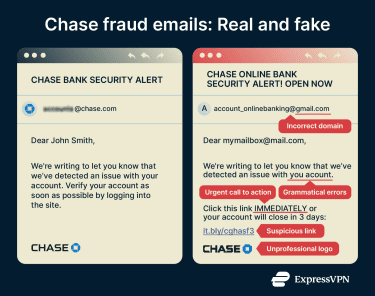 Legitimate alerts are typically informational and point customers to established methods for confirming account activity. Phishing messages more often rely on urgency or pressure and steer recipients toward a single response path controlled by the sender.
To evaluate a message without interacting with it, check sender details, preview link destinations (without clicking), and look for a safe, independent way to confirm the information through official channels.
Previewing a link destination helps compare the web address with Chase’s legitimate site and can reveal mismatched or misleading URLs commonly used in phishing.
In a desktop browser, hovering the cursor over a link typically reveals the URL (often in the status bar). On mobile, the exact behavior depends on the app and device. A press-and-hold may show a context menu that reveals the destination (for example, via “Copy link”), but some interfaces may display a link preview or open an in-app viewer to load the content.
The most common Chase phishing scams
While designs and wording change, the same underlying themes appear repeatedly in phishing campaigns.
Fake account suspension alerts
These messages claim that an account has been restricted or suspended and that access may remain limited until the personal information is verified.
The message typically includes a link that leads to a fraudulent login page designed to capture credentials or other sensitive information.
In practice, Chase may notify customers about account or security issues, but unsolicited messages that insist account access can only be restored by clicking an email link or submitting information through an embedded form should be treated with caution.
Legitimate communications are intended to guide customers toward secure account review through established channels.
Unauthorized charge or payment notifications
These emails claim a charge or transfer has occurred and urge an immediate response. Following the prompt often leads to a fraudulent page designed to steal the target’s login credentials.
When Chase detects potentially unauthorized activity, it may notify customers and direct them to review account activity through established channels. It doesn’t rely on embedded links or ask users to confirm transactions through email.
Messages claiming that an email reply or a single click is the only way to verify a transaction are likely to be part of a scam.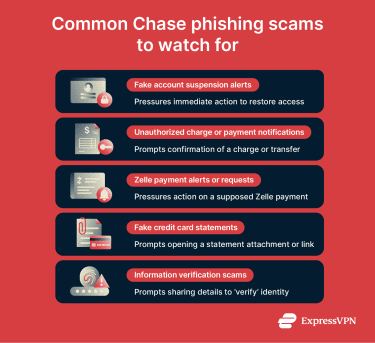
Zelle payment request scams
Zelle often appears in Chase phishing scams because it is available to Chase customers as a peer-to-peer (P2P) money transfer service within the Chase app and on chase.com. These messages often claim a Zelle payment is pending, failed, canceled, or requires immediate action, and then steer recipients to a link controlled by the sender.
When real Zelle activity occurs, customers can review it in the Chase app or through the official website. Checking payment history through those official channels provides a reliable way to confirm whether a transfer has been made and whether the message matches actual account activity.
Fake credit card statements
These messages claim to provide access to a recent credit card statement, often through a download link or attached file. The content is designed to look routine, but even a PDF can be used to deliver malware or to direct recipients to malicious sites.
Alternatively, the statement may include large payments and a message urging the customer to call a number (controlled by scammers) if anything looks suspicious.
Chase normally makes statements available through its secure online platform or mobile app. Statements can be reviewed by signing in through official channels rather than relying on emailed attachments or links.
“Update your information” verification scams
Scammers also target Chase customers with requests to confirm personal details. They may reference policy updates, security checks, or system changes to seem legitimate. The goal is often to harvest sensitive information (including sign-in credentials) by soliciting a reply or sending the target to a phishing page.
Chase’s security guidance warns against providing personal information through email links or forms and favors reviewing or updating account details through official channels after signing in.
What to do if you received or clicked on a suspicious email
Not every interaction with a suspicious email carries the same level of risk. Next steps typically depend on whether you opened a message, clicked a link, entered account details on a suspicious page, or downloaded or opened an attachment.
Immediate steps to secure your Chase account
If you clicked on a phishing link or shared personal details, here are a few immediate steps you can take that can help limit potential risk:
- Stop interacting with the suspicious email: Close the message and avoid any further clicks, replies, or forwards.
- Access Chase accounts through official channels: Use the Chase mobile app or manually enter the official website address in a new browser tab.
- Update the account password if sign-in details were compromised: Use a strong, unique password not used elsewhere.
- Enable two-factor authentication (2FA) if it is available: Add an extra layer of protection by requiring a second verification step when signing in.
- Review recent account activity: Check transactions, transfers, and account settings for unexpected changes.
How to check for unauthorized activity
Reviewing recent account activity can help identify early signs of misuse, potentially even before serious damage occurs. Account takeovers often involve small changes or low-value activities that can be easy to miss. Here’s what to keep an eye on:
- Transaction history: Look for unrecognized purchases, transfers, or withdrawals, including small "test" charges that may appear before larger transactions.
- Payments and recipients: Check whether any new payees, Zelle recipients, or bill-pay entries have been added to your account.
- Profile details: Review your email address, phone number, and mailing address to confirm they have not been changed without your authorization.
- Security settings: Confirm that the password, security questions, and 2FA settings remain unchanged.
- Account alerts: Watch for password reset emails, login notifications, or settings changes that were not initiated by the account holder.
When to contact Chase support
If you receive a phishing email, you don’t always need to notify the company, but Chase should be contacted promptly if there are signs that your account may be compromised or if you shared any sensitive information. Do so if any of the following occurred:
- Credentials or one-time security codes were entered on a page reached through the email.
- Personal or account details were shared after visiting a phishing page or calling a number listed in the message.
- Unexpected transactions, transfers, or profile changes appear in the account.
When reporting an issue, make sure you contact Chase using official contact information (for example, the number on the back of the card or verified numbers from Chase’s official site).
In cases of fraud, reimbursement may be possible. Contacting Chase directly is the best way to confirm what applies in a specific situation.
How to report Chase phishing emails
Reporting is usually quick and can help Chase or the relevant authorities track and respond to phishing campaigns.
Forwarding suspicious emails to Chase
Chase asks customers to forward emails that claim to be from the bank to phishing@chase.com.
Forwarding the original message allows Chase to review technical details and may support any investigation it chooses to make. Some email services include these details automatically when messages are forwarded as attachments, though a standard forward can still be useful.
Once the message has been forwarded, it can be safely deleted.
Reporting scam messages and calls
If you also receive scam phone calls or text messages, those can be reported as well. Chase provides guidance for handling and reporting suspected scams across channels in its Security Center, and you can report unauthorized activity or suspected account compromise through Chase’s official contact channels.
Phishing attempts can also be reported to national fraud-reporting agencies. For example, in the U.S., the FBI’s Internet Crime Complaint Center (IC3) is commonly used to report cyber-enabled fraud and phishing activity.
Blocking scammers
Marking a phishing message as spam (or junk) and blocking the sender can help email providers improve filtering and may reduce similar messages appearing in the future.
Because scammers frequently change addresses and spoof sender details, blocking a single sender is unlikely to keep phishing emails out of your inbox. Recognizing common phishing patterns remains the most reliable way to stay safe in the long run.
Protecting against Chase phishing scams
Phishing prevention is about reducing everyday risk. Recognizing common red flags in suspicious messages and enabling 2FA are two of the most effective protections. Built-in security tools can also add another layer of defense.
Tools that help detect and block phishing attempts
Phishing protection usually combines user awareness with technical safeguards.
- Email filtering: Most email providers block large volumes of spam and known phishing messages, though new scams regularly appear before filters are updated.
- Web browser protections: Modern browsers and built-in security services often warn users when a website is known (or suspected) to host phishing pages or malware.
- Security software: Antiviruses and endpoint tools can add another layer by scanning attachments and blocking or warning about some malicious destinations.
Some privacy and security tools can also reduce exposure to known malicious domains. For example, ExpressVPN’s Threat Manager can block connections to certain domains associated with tracking or malicious behavior. However, virtual private networks (VPNs) are generally designed to enhance privacy (by encrypting traffic in transit) rather than serve as dedicated phishing protection.
Why Chase phishing emails are so dangerous
A phishing email can have serious consequences. When account information or personal data is exposed, it can create ongoing security and financial fallout. It may increase the likelihood of further phishing, as attackers can use leaked details to make scam messages more convincing.
If scammers gain access to Chase sign-in details, they may attempt unauthorized account activity, such as transferring funds through available payment features or changing account settings to maintain access.
Over the longer term, successful phishing can contribute to identity theft if personal data is captured. That can lead to serious financial and personal consequences, including the opening of fraudulent accounts or loans, and more targeted scams if stolen information is reused or circulated. Data leaks are a major factor in identity theft, which is why strengthening personal information security and ongoing monitoring remain important after a breach.
Finally, password reuse can widen the impact beyond a single account. If the same Chase password is used on other sites, the compromised credentials may be tested elsewhere, potentially leading to multiple accounts being compromised.
How Chase phishing emails appear on mobile devices
Mobile devices pose additional challenges when identifying phishing emails. Smaller screens and simplified interfaces often hide important details that are easier to see on a desktop computer.
Hidden sender domains in mobile apps
Most mobile email apps display only a sender name by default, such as “Chase Fraud Alerts,” and may not show the full email address.
The underlying sender information is usually hidden behind an expand/tap, which can make deceptive messages look legitimate at first glance.
How to expand full sender details on iOS and Android
Although the exact steps vary by app, sender information can usually be expanded by selecting the sender name or a “details” header near the top of the message.
- In Apple Mail: Tap the sender name to reveal the full address.
- In Gmail: Tap the small arrow next to the sender to show both the sender and reply-to fields.
- In Outlook for Android: Tap the sender name to open a panel with additional details.
Once visible, comparing the From and Reply-To fields (when present) can help surface inconsistencies commonly seen in phishing.
Why mobile users may fall for these scams more easily
Mobile email is often read quickly and in short moments between other tasks. Notifications can encourage rapid attention, while limited screen space reduces the visibility of warning signs.
For users who manage their banking on their phones, reviewing account alerts directly in the official app or on the bank’s website is a more reliable way to verify messages.
FAQ: Common questions about Chase fraud emails
Does Chase offer official fraud alerts?
Yes. Chase sends legitimate fraud and security notifications and publishes guidance on how to spot suspicious messages. The bank also states that it doesn't request confidential information, such as usernames, passwords, or PINs, via email or text message.
How can I tell if a Chase email is real?
Common red flags include a mismatched sender address, grammatical errors, and urgent calls to action. If the email includes a link or requests sensitive information, treat it with caution. It’s typically safest to verify suspicious alerts through official channels, such as signing in via the Chase app or manually entering the official website address and reviewing account alerts or activity there.
What should I do if I clicked a scam link?
If you opened a link without entering any information, closing the page and running a reputable security scan can help check for potential issues. If you shared login details or one-time codes, it’s best to change the affected account credentials and contact Chase through official channels immediately.
How can I report phishing emails to Chase?
Chase asks customers to forward emails that claim to be from the bank to phishing@chase.com. You can also report phishing incidents to the relevant national authorities.
What signs indicate that an email is phishing?
Phishing emails often include inconsistent sender information, misleading links, urgent or pressuring language, requests for sensitive data, or unexpected attachments. Messages that encourage calling a number listed in the email rather than using official contact details are also commonly associated with scams.
How do Chase security notifications normally look?
Legitimate notifications are often concise and professional, focusing on informing customers about activity and pointing toward secure ways to review it. Chase also states it won’t request confidential information, such as a user name, password, or PIN, via email or text message.
How can I protect my Chase account from future scams?
There are a few steps you can take to strengthen your account security. Using unique passwords, enabling two-factor authentication (2FA), and avoiding login links in emails all help reduce exposure to phishing. Understanding how password theft occurs can also help you recognize suspicious messages earlier.
Take the first step to protect yourself online. Try ExpressVPN risk-free.
Get ExpressVPN