How to stop getting spam texts and stay safe


Spam texts add unwanted messages to your inbox, increasing message volume and making it harder to keep track of legitimate conversations and alerts. But they aren’t just an annoyance. While some spam texts are harmless ads or bulk notifications, others are deliberately designed to push you into clicking on malicious links or sharing sensitive information.
In this guide, we'll look at how to block and report spam texts, reduce how often your number is targeted, and understand the risks associated with certain messages.
How to stop spam texts
One of the most effective ways to reduce spam messages is to block specific senders and enable platform-level spam filtering.
Blocking stops future messages from a number you’ve already received a text from. Spam filtering uses system-level detection to identify and route suspected spam to a separate folder. Both iPhone and Android support these controls in their default Messages apps.
Block spam messages on iPhone
On iOS, you can block spam by blocking a sender and enabling spam filtering.
Block a spam sender
- Open Messages.
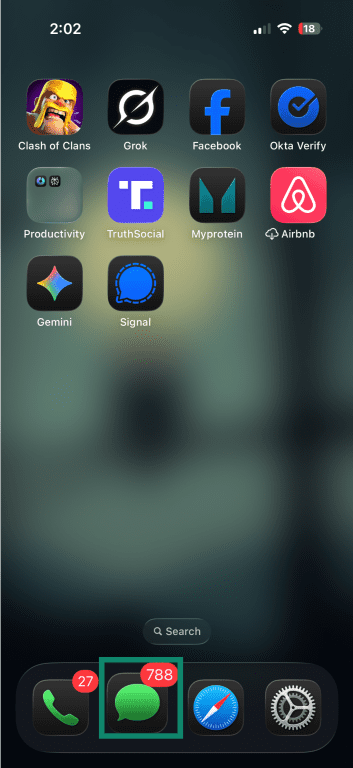
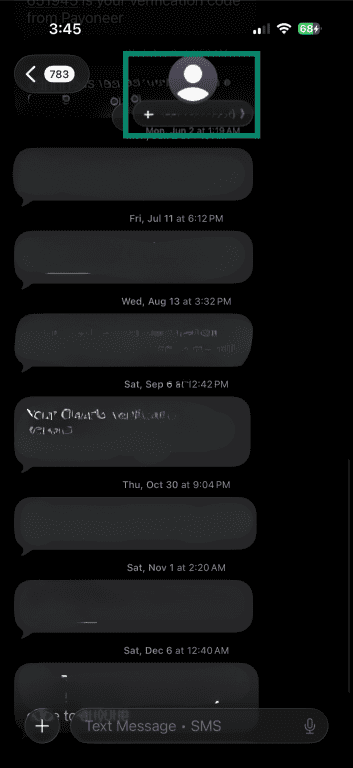
- Open the spam conversation and tap the sender’s name or number at the top of the screen.
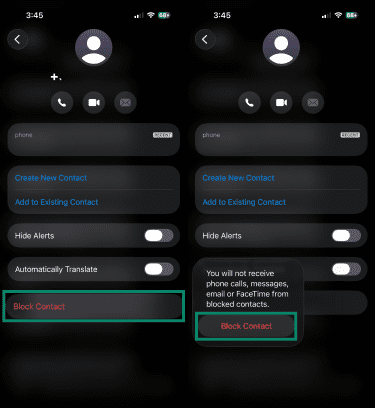
- Tap Block Contact, then tap it again to confirm.
Turn on spam filtering
- In the Messages app, tap the Filters button (horizontal lines) at the top of the message list, then tap Manage Filtering.
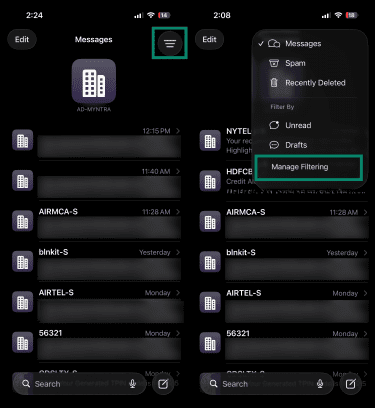
- Turn on Filter Spam.
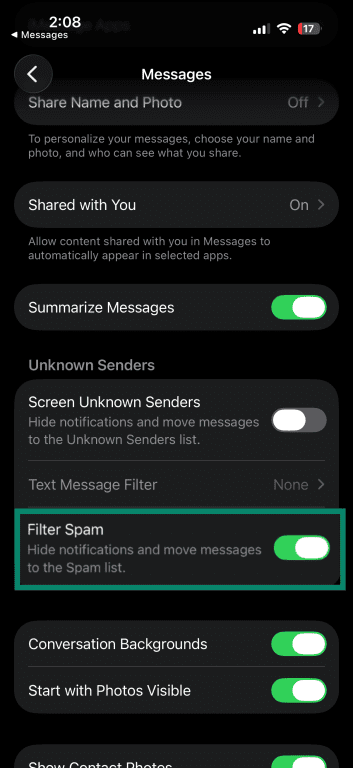
iOS will now attempt to detect spam messages automatically. You can review filtered messages at any time by tapping the Filters icon and selecting Spam or Unknown Senders, depending on how the message was classified.
Block spam messages on Android
These steps apply to phones running Google Messages, the default messaging app on many modern Android devices. However, some manufacturers, like Samsung, may use a different messaging app by default, depending on the model and region.
Block a spam sender
- Open Messages and find the spam conversation.
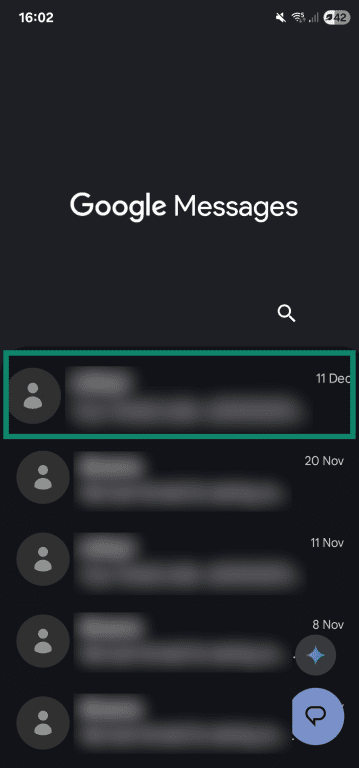
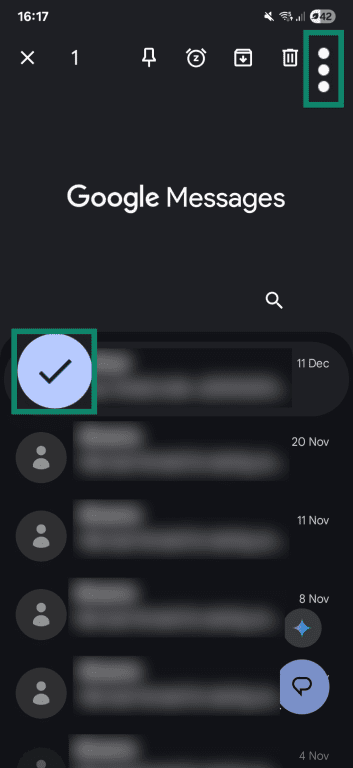
- Tap and hold the conversation with the sender you want to block, then tap the three dots in the top right-hand corner.
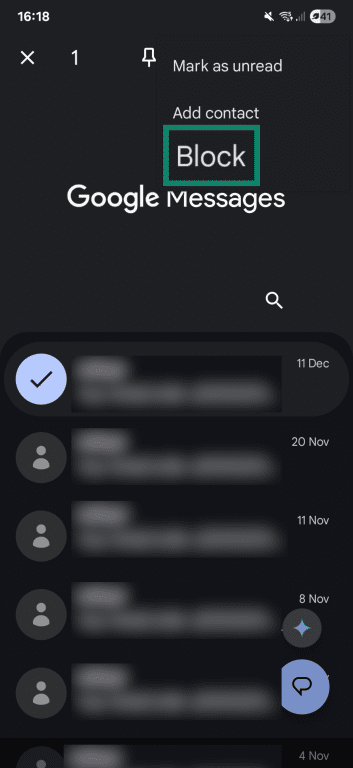
- Tap Block, then Yes when asked to confirm. You might also be given the option to report the message as spam.
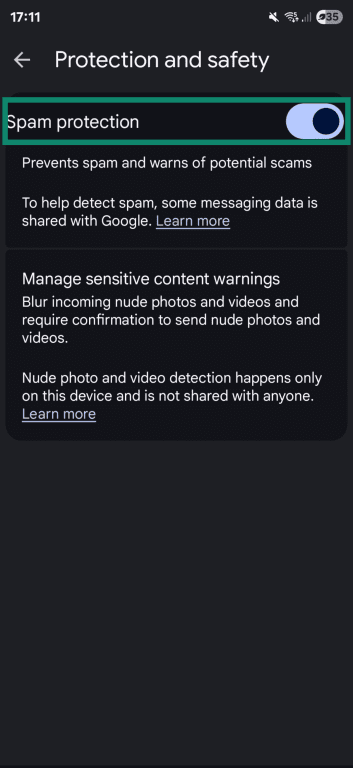
Turn on spam protection
Google Messages includes built-in spam protection that automatically identifies and filters suspected spam.
- Open Messages and tap your profile icon in the top-right corner.
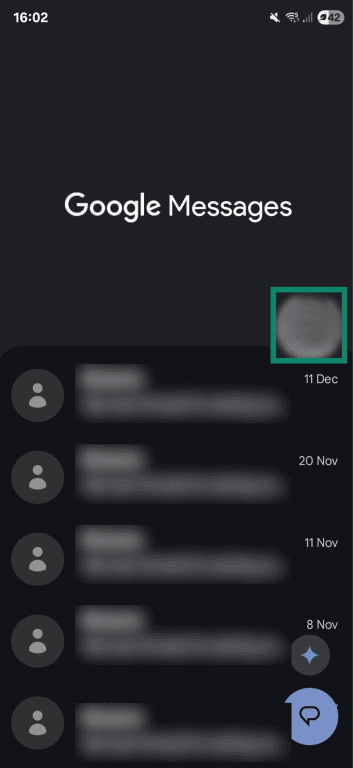
- Tap Messages settings.
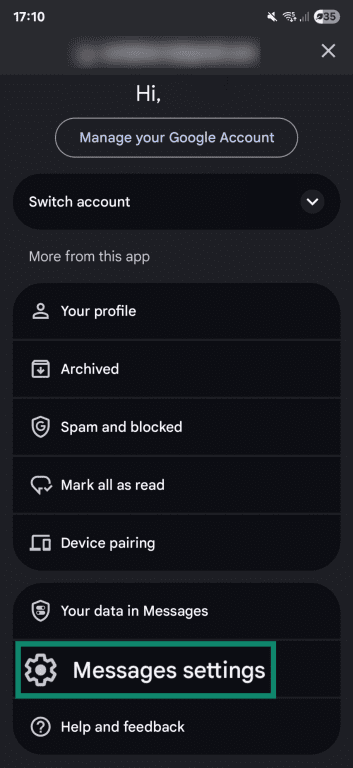
- Scroll down and tap Protection and safety or Spam protection, depending on your device.
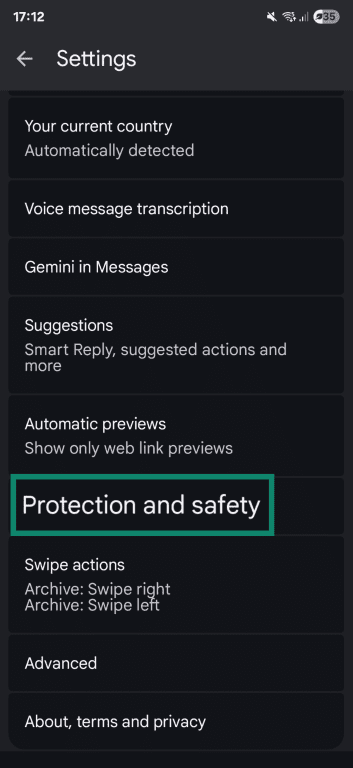
- Toggle Spam protection on.
How to report spam texts
Reporting spam texts helps platforms and carriers detect abusive senders and refine spam-detection systems. Reporting doesn’t stop messages on its own; it flags the message so future spam can be identified more effectively.
Reporting spam texts on iPhone
- Open Messages and find the spam conversation.
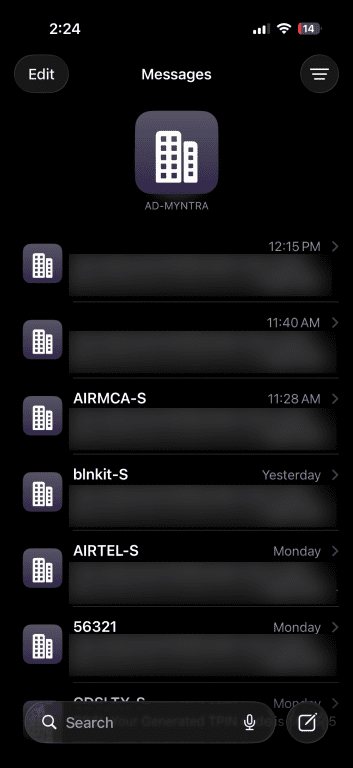
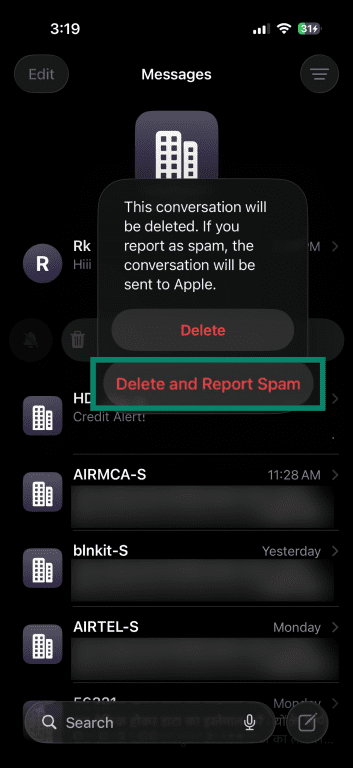
- Swipe left on the conversation and tap Delete and Report Spam when that option appears.
Reporting spam texts on Android
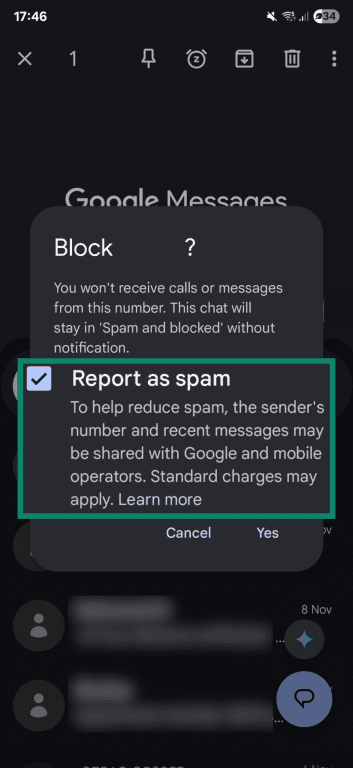
On Android, using Google Messages, you can report a message as spam when you're blocking the sender.
- Follow the steps above to block a sender.
- When prompted to confirm the block, tap the checkbox next to Report as spam, then tap Yes or OK to confirm.
Reporting spam to your carrier
You can also report spam texts directly to your mobile carrier, which helps block large-scale spam campaigns at the network level.
In many regions, including the U.S. and parts of the U.K.:
- Open the spam text message.
- Forward the message to 7726 (which spells “SPAM”).
Your carrier may reply asking for confirmation or additional details. If 7726 isn’t supported in your country, check your carrier’s support site for their recommended spam-reporting method.
Related: Most secure messaging apps for privacy.
How to reduce spam by limiting exposure of your phone number
Preventing spam at the source often involves limiting how widely your number is exposed. Many spam texts originate when phone numbers are collected, shared, resold, or leaked from services where they were originally used legitimately.
How spammers obtain your phone number
In many cases, spam texts are sent to numbers that were collected long ago or obtained indirectly. Common sources include:
- Direct sharing through sign-ups and purchases: Many spam messages originate because you shared your phone number willingly when opening accounts, completing online purchases, or subscribing to services.
- Third-party list aggregation: Marketing contact lists may be combined or resold between companies, sometimes within the limits of local consent and data-protection laws.
- Past data breaches or leaks: Phone numbers exposed in older security incidents can persist for years, even after the original service is no longer in use.
- Number recycling: Mobile carriers reassign inactive numbers. If a number previously belonged to someone who shared it widely, the new owner might continue to receive spam.
- Automated number generation: Some spam campaigns send messages to large ranges of numbers to identify which ones are active.
Once acquired, your number is often added to a system built for high-volume messaging. These systems allow a single message to be dispatched across thousands or millions of numbers in a short time. That’s why most large-scale spam campaigns rely on fixed message content that doesn’t require personalization.
Privacy settings for apps and accounts
Many online services use phone numbers for practical reasons, such as sign-up verification, account recovery, or contact matching. However, for some services, sharing your number carries the risk that it may later appear in leaked datasets, be exposed through security incidents, or be shared with third parties, depending on the service’s data practices.
If email-based recovery or app-based authentication is available, use those instead. You might want to also check the privacy settings on messaging apps to confirm that your number isn’t publicly visible. Some apps don’t make numbers “public” but still allow contact discovery or username lookups, which can indirectly expose numbers. Similarly, publicly visible phone numbers can be scraped by data collectors and spammers.
Accounts you no longer use may still store your phone number, too. Over time, services can change ownership, policies, or data practices. Over time, services can change ownership, policies, or data-handling practices, which may affect how older user data is stored or reused. Review inactive accounts and remove your number where possible, or close the account entirely, to help reduce long-term exposure.
Alternatives to using your personal number
Using one phone number for every service is convenient, but it puts that number at risk. Here are some alternatives to handing over your personal number:
- Secondary number: Use a low-cost eSIM or prepaid number for online accounts, sign-ups, deliveries, or customer service interactions. However, some services may restrict certain number types for verification.
- Temporary or disposable number: Use one-time number services for low-risk registrations or trials. Just note that many platforms block disposable numbers for sign-in codes or account verification, which can limit availability.
- Virtual number: Try an app-based number, which lets you receive calls and texts through an online service rather than using your phone. Virtual numbers work well for everyday calling and texting, but some banks, payment apps, and social platforms may not send verification codes to Voice over Internet Protocol (VoIP)-based numbers.
- Forwarding number: Provide a forwarding number as a stand-in for your real number. Depending on your provider, calls and sometimes texts are forwarded to your main number. However, SMS support varies.
How to recognize a spam text
Spam texts often look similar because many of them are created and sent automatically rather than written for individual recipients. This leads to a few recurring patterns across different campaigns and senders.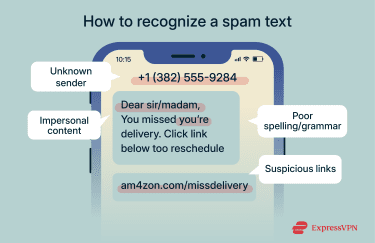
Common red flags include:
- Unknown or suspicious sender: Legitimate business messages are often labeled with the brand’s name or sent from a recognizable short code or verified sender, though this isn’t guaranteed in every region or on every device. Messages from unknown numbers that claim to be from a business are more likely to be spam, especially if they’re unexpected or lack clear identification.
- Limited or missing context: Spam texts often avoid personal details. They might refer to an order, account, or update without explaining what it’s related to. This is because the same message is sent to large lists of numbers, regardless of whether the recipient actually has a matching transaction or account.
- Poor spelling or awkward grammar: Legitimate companies usually proofread their messages. Spam texts may contain odd wording or phrasing, whether written hastily or generated by AI.
Security risks of spam text (smishing)
Not all spam texts are harmless junk. Some are designed to move beyond unwanted promotions and into attempts to collect sensitive information, credentials, or money. This is commonly referred to as SMS phishing (smishing).
How spam texts turn into phishing attempts
A spam text becomes a phishing attempt when it tries to trick you into sharing information or taking action that might put you at risk. This can happen in the first message or through a follow-up, depending on how the campaign is designed.
Common ways this transition happens include:
- Requests for information: Messages asking you to confirm details like payment information or account status. These requests are often unexpected or lack context about the service involved.
- Impersonation of public authorities: Texts that claim to come from government agencies, toll operators, or enforcement bodies, warning about unpaid fees, missed filings, or penalties, and urging immediate action to avoid consequences.
- Links to external pages: Texts that include links to malicious websites. While legitimate services may also send links, smishing messages often use shortened, misleading, or hosted URLs that don’t clearly belong to the organization they claim to represent.
- Job or income offers: Messages promoting easy work, fast earnings, or guaranteed income, typically with minimal details and a link or reply prompt designed to move the conversation off-platform.
- Routine-sounding prompts: Messages referencing deliveries, subscriptions, refunds, or security alerts. These scenarios are used because they’re familiar, encouraging you to respond without thinking.
- Prize or reward claims: Messages that announce a win, refund, or exclusive reward, often without context, such as a gift card or cash prize that requires you to click a link or provide details to “claim” it.
Related: How to prevent phishing attacks.
Why you should never click on unknown links
Links in spam texts are one of the most common ways smishing attempts escalate. Even without entering information, simply opening a link can expose your device or browser to tracking, redirection, or exploit attempts. Possible outcomes include:
- Credential collection: A page may ask you to sign in or enter details, capturing information that can be used to log into your real accounts.
- Malware or tracking: Some links lead to downloads or pages that attempt to install tracking tools or malicious software, especially on devices running outdated software or with weaker security protections.
- Follow-up targeting: Clicking a link can signal that a number is active, potentially leading to additional messages or attempts later.
How a virtual private network (VPN) helps protect your privacy
VPNs don't stop spam texts or affect who can message your phone number. Those things depend on your carrier, your phone's settings, and how often your number is shared. However, some VPNs can block malicious links if you click on one.
As mentioned above, some spam texts (especially smishing attempts) try to push you toward a harmful website. If you tap a link by mistake, a VPN with built-in protections can help. For example, ExpressVPN's Threat Manager can prevent your device from connecting to a blocklist of known malicious sites. If the site is flagged, the connection is blocked before any page loads, even if the link came from an SMS.
A VPN also hides your real IP address, which helps prevent attackers from tying a click back to your physical location or network connection. However, it doesn't hide information you voluntarily share.
FAQ: Common questions about spam texts
Why am I suddenly getting so many spam texts?
Spikes in spam can happen after a number appears in a new dataset. This can follow a data breach, a marketing sign-up, number recycling by carriers, or the reuse of older contact lists. In many cases, the increase isn’t tied to anything you did recently.
How do I remove my number from a spam list?
There’s no single list you can remove your number from. Spam campaigns usually rely on multiple, reused lists. The most effective approach is limiting future exposure by removing your number from unnecessary accounts, avoiding optional phone number fields, and using secondary numbers for sign-ups.
Why are spam texts dangerous?
Spam texts can be dangerous because they’re often used to push actions that put your personal data or devices at risk. This can include redirects to fake websites that collect login or payment details, triggering downloads that install malicious software, or confirming that a phone number is active so it can be targeted again. The risk depends on what the message asks you to do and how you respond.
What regulations exist against spam texts?
Many countries have laws restricting unsolicited messages, such as the U.S. Telephone Consumer Protection Act (TCPA) and similar consumer protection rules elsewhere. These regulations limit legitimate businesses but don’t stop illegal or overseas spam campaigns, which is why spam texts still occur.
What should I do if I interact with a spam text?
If you clicked a link or replied, stop engaging with the message. Avoid providing any information. If you shared account details, change the affected passwords and review recent activity. You should also report the message to your carrier to help flag similar attempts in the future.
How do I set up filters on my phone?
Both iPhone and Android let you turn on spam filtering directly from the default Messages app. On iPhone, filtering options are available through the Messages settings and can separate suspected spam into a separate view. On Android, Google Messages includes built-in spam protection that can be enabled from the app’s settings.
Are there apps that help block spam texts?
Some third-party apps offer additional filtering or reporting features. Results vary, and effectiveness depends on the data they use.
Take the first step to protect yourself online. Try ExpressVPN risk-free.
Get ExpressVPN