The SLAM method for enhanced email and phishing security


Sender, Links, Attachments, and Message (SLAM) is an acronym that helps prevent you from falling victim to phishing attacks. It serves as a starting point for evaluating risk when you receive suspicious and potentially harmful emails.
This guide explains what SLAM is and how to use it to assess potentially malicious emails. It also discusses how phishing attacks are evolving and explains why SLAM is still a strong first line of defense, even as attacks become more sophisticated.
What is the SLAM method?
The SLAM method is a helpful acronym for spotting and preventing phishing attempts in emails by raising awareness about common signs of an attack.
It stands for:
- Sender: The name and email address of the person or organization contacting you, often impersonated or slightly altered in phishing attempts.
- Links: URLs embedded in an email may lead to malicious websites or spoofed login pages that can steal your credentials.
- Attachments: File attachments included with the email could contain dangerous code and infect your device with malware if you open or download them.
- Message: The content and language of an email may provoke a sense of urgency to trick you. Cybercriminals also use generic greetings and familiar branding to create a false sense of trust. You might also notice grammar issues or subtle misspellings.
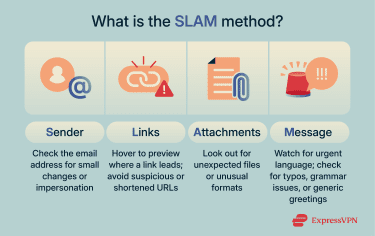 Remembering this acronym encourages you to slow down and inspect emails closely so you don't fall prey to attacks as easily as you might otherwise.
Why SLAM is used in phishing prevention
Phishing attacks rely on human error; attackers know that people don't always check emails carefully before clicking links or downloading attachments. They design emails to look familiar and trustworthy to lower suspicion, and sometimes suggest an urgent problem to prompt you to act without thinking.
Using SLAM contributes to overall email security by helping you notice slightly misspelled domain names, grammatical errors, or letter changes in a familiar email address.
Common misconceptions about SLAM
SLAM can be a useful framework for spotting phishing emails, but it’s not a complete defense on its own. Here are some common misconceptions about SLAM that could create a false sense of security.
1. “SLAM will catch everything”
SLAM can help you identify some subtle red flags, but sophisticated phishing emails can still evade detection. It’s intended as a first-line check, not a complete anti-phishing strategy. When something feels even slightly off, take additional steps, like verifying the communication is legitimate through a separate channel.
It’s also worth noting that even if a link in an email looks normal, it could still lead to a fake login page or, in rarer cases, a legitimate site that has been compromised. In some cases, attackers use techniques like malicious redirects to silently send users to the wrong destination.
2. “One training session is enough”
Just going over SLAM once is not enough. Regular refresher training, real-world examples, and simulated phishing tests are necessary to keep the habit strong and effective. An investigation published on USENIX, a non-profit computing research organization, found that improvements in phishing awareness were no longer statistically significant after six months without refreshers.
3. “Email filters make SLAM unnecessary”
Email filtering is important, but it doesn’t stop every threat. Some phishing emails can bypass filters, especially those using low-volume targeting or sent from compromised accounts, like a real vendor, coworker, or partner whose account has been taken over. SLAM adds a human layer of protection on top of your technical defenses.
How to use SLAM to detect phishing
Using SLAM involves knowing what to look for and how it helps you spot suspicious emails before it’s too late.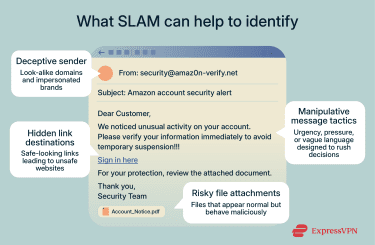
Sender verification
Start by carefully checking who the email is from. Attackers often spoof trusted brands by using names that look familiar at a glance. A small change in the domain can indicate a phishing attempt.
Small differences in email addresses
Phishing emails often contain easy-to-miss changes in the email address domain. For instance, a spoofed address for example.com could be something like support@example.net. At first glance, it looks like you’re getting a message from a trusted source, but the subtle swaps, extra words, or different domains give it away.
Always double-check the full email address, not just the display name, before interacting with the email. On desktop, hover over the sender’s name to reveal the full address. On mobile, tap the name to expand it. If it seems suspicious, check with the person in another way, like calling or messaging them directly.
Unfamiliar or out-of-context senders
Another red flag is when an email appears to be from a real company or contact, but it doesn’t make sense in context; for example, an unsolicited email from a coworker who usually reaches out on Slack instead.
Even if the name and address look familiar, the timing and content still matter. If something feels off or out of place, it’s worth taking a moment to verify.
Link safety
Next, look closely at where links in the email actually lead. Phishing emails often use links that look legitimate but send you somewhere unexpected.
Mismatch between link text and destination
To disguise the real link destination, phishing attempts often use deceptive formatting. What looks like a familiar link can send you somewhere completely unrelated. This is especially common in HTML emails, where the visible text can say one thing but the hyperlink can lead elsewhere.
Bad actors design these mismatches to be easily overlooked. And it often works, as some people just glance at the anchor text and assume it’s safe, especially if the branding looks right. But a hidden redirect could lead to a spoofed login page or a malicious site. Hovering over the link (on desktop) or long-pressing (on mobile) shows you the real destination before clicking.
That said, on mobile, you might not see the full URL with a long press. To check the link fully in Gmail on mobile, you can long-press on it, copy the link, and paste it into a text editor to inspect it fully.
Use of shorteners or unusual domains
Another way attackers disguise malicious links is by hiding the destination entirely. URL shorteners and suspicious domain tricks are common in phishing campaigns, especially when the goal is to avoid detection or make the link look less suspicious in a crowded inbox.
Here are a few things to watch for:
- Shortened URLs: Services like Bitly or TinyURL mask the final destination, making it harder to judge if a link is safe.
- Misleading domains: Addresses like secure-login-info.com look official but may lead to phishing sites.
- Subdomain tricks: Fake sites that use familiar names at the start to seem trustworthy.
If you’re unsure about a shortened URL, you can use a URL expanding tool, or add a plus sign to the end of a Bitly link (bit.ly/example+) or “preview.” to the front of a TinyURL link (preview.tinyurl.com/example).
Attachment check
Email attachments are one of the easiest ways for attackers to deliver malware. A few small signs can help you spot the difference between a harmless document and a potential threat.
Unusual file types or names
Phishing emails often include attachments that look like harmless documents (like PDFs or Excel spreadsheets) but are actually malicious or contain hidden malware that activates when opened. Even genuine-looking document files can be dangerous if they prompt you to "enable content" or macros, which are like tiny automated programs hidden in the file that can run harmful code if activated.
Watch for double extensions (e.g., Invoice.pdf.exe, where the real type is executable), unusual or mismatched extensions (e.g., .js, .scr, .iso, .html, or .zip pretending to be a simple document), or prompts to enable macros in Office files.
Unsolicited documents
When you receive unexpected attachments from someone who doesn’t usually send files or from a sender you weren’t expecting to hear from, it’s a good idea to treat them with caution. It might look like something routine, like a receipt or notice, but it could be carrying hidden malware. If the attachment doesn’t clearly relate to anything you’re doing or expecting, it’s better to pause than to open it on instinct.
Message review
The language and tone of an email can reveal a lot about its intent. Phishing messages often use generic phrasing, and they might employ emotional pressure to catch you off guard.
Urgent language
A common trick threat actors use in phishing is to make you feel like you have no time to think. That sense of urgency can cloud your judgment, causing you to overlook the subtle telltale signs. Attackers rely heavily on this.
You might see phrases suggesting a problem needs immediate action; otherwise, your money, data, or account will be lost or locked if you don’t respond right away. If the tone of the email feels like it’s trying to push you into a decision, that’s a warning sign.
However, this doesn’t mean that an email that doesn’t use urgent language is automatically safe. Attacks like spear phishing can involve sending lower-pressure messages and rely on other tactics, like being extremely specific, to target individual victims.
Generic greetings and bad writing
Organizations and people sending genuine emails know your name and typically use it. Cybercriminals launching phishing attacks, on the other hand, often send a high volume of generic emails, hoping just a few people will fall for it. If you receive an email with a greeting like “Dear Customer” or “Hello User,” it could mean the sender doesn’t know your name, and it might be phishing.
That said, attacks are becoming increasingly sophisticated, with some attackers using deepfakes and creating more personalized attacks. What’s more, legitimate companies sometimes use generic greetings in large-scale marketing emails or newsletters. So, generic greetings alone aren’t a foolproof sign of phishing.
Despite advances in AI, spelling mistakes and bad grammar are still common in phishing emails, along with phrasing that doesn’t match the supposed sender’s usual style (like a bank sending emails with casual language). These details can be subtle, but they stand out once you know what to look for.
How phishing techniques have changed over time
Phishing is increasing in sophistication, and AI-fueled phishing attacks are now one of the leading cybersecurity concerns. Scammers' messages aren’t as easy to spot as they were; AI has given attackers a new way to make phishing attempts more believable.
Research by Enea, a telecom and cybersecurity company, showed that phishing, vishing (voice phishing), and smishing (SMS phishing) attacks increased by 1,265% in the year following the release of ChatGPT in November 2022. AI lets cybercriminals easily mimic the writing styles of trusted organizations such as banks or other financial services. They can generate more convincing emails to trick you into trusting them enough to click on malicious links or give away sensitive information.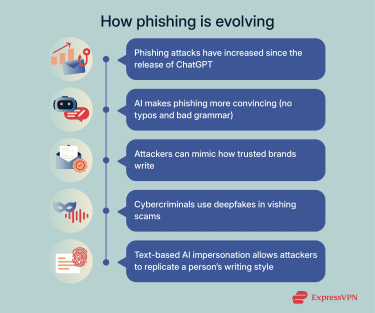
The rise of deepfakes and phishing
Deepfakes represent a new and growing dimension of phishing-related cybercrime. Cybercriminals use deepfake technology to clone human voices or faces. In some cases, this technology has been used to defeat weaker or improperly implemented biometric verification systems, particularly voice-based authentication. This can lead to account hijacking, asset theft, and identity theft.
Even in text form, AI-generated impersonation makes it easier for cybercriminals to copy how someone writes. That means phishing emails can look more believable and feel exactly like something the real sender would write.
There are documented cases of finance workers transferring tens of millions of dollars into criminals’ accounts after being tricked by deepfake calls cloning a CEO's voice and likeness. According to an IBM report, deepfake-enabled phishing attacks have led to significant financial losses, including an incident following the Retool phishing attack in which a cryptocurrency client lost $15 million.
Why SLAM is still important in cybersecurity
Even though AI has made phishing attacks more frequent and convincing overall, some aspects of phishing haven’t changed. Email content might be more convincing, but a fake URL is still a fake URL.
That’s why SLAM is still a good method for checking details AI can’t hide, like mismatched domains, risky file types, or links that lead somewhere unexpected. It’s not enough on its own, but it pairs well with other tools and habits, like email security filters, antivirus software, browser extensions, and double-checking a sender or link through a trusted channel.
FAQ: Common questions about the SLAM method
What is the SLAM method?
SLAM is a phishing identification method. It can help you identify phishing attempts before interacting with malicious emails.
How do I apply the SLAM technique in real life?
Using the SLAM technique for phishing starts with looking at who the email is from. You should always check the full email address to make sure it’s legitimate. Then, look carefully at any links in the email to make sure they lead to a safe and trusted source. If there are attachments, inspect the file properties for anything suspicious and whether the file type is safe. Lastly, read the message for red flags like urgent language, generic phrasing, or odd wording.
Can SLAM be used in employee phishing awareness training?
Yes, the SLAM cybersecurity method is often part of employee phishing awareness training. It gives employees a consistent way to evaluate suspicious emails. Cybersecurity specialists teach staff to inspect emails systematically to reduce the number of successful phishing scams. This helps organizations with compliance efforts by protecting customer data from phishing-related malware attacks.
What are common mistakes people make when using the SLAM method?
One mistake when using SLAM is not checking the email address letter by letter. Fake email addresses are often designed to look very similar to those of genuine organizations. Another is assuming a message is safe just because it greets you by name. While many phishing emails use generic greetings, attackers might also know your name. So if an email greets you personally, it doesn’t rule out the possibility that it’s still a phishing attempt.
What are the benefits of using the SLAM method?
The SLAM method helps you catch cyber threats your spam filter might miss. It trains you to closely inspect sender details and email content more critically. Ultimately, this helps prevent phishing attacks by raising awareness about how to identify red flags.
How does SLAM compare to other phishing detection methods?
SLAM focuses on human awareness rather than automation. Tools like spam filters and antivirus software work in the background, but they can’t catch everything. SLAM gives you a manual way to review emails, which helps you spot threats that rely on timing, urgency, or social engineering.
What tools can support SLAM-based email review?
SLAM doesn’t require any special software. Most modern email platforms already show the details you need, like full sender addresses and link previews. By slowing down and using what’s already in front of you, you can apply SLAM alongside technical defenses (like email filtering) to catch phishing attempts before they do any damage.
Take the first step to protect yourself online. Try ExpressVPN risk-free.
Get ExpressVPN