What is geotargeting? How location tracking impacts privacy and security


Many apps and websites use your location, alongside other information, to decide what content to show you. It affects the ads you see, the prices displayed, the language a site loads in, and whether certain features are available in your area.
This practice is known as geotargeting. While it can make online services more relevant and convenient, it also relies on collecting and analyzing potentially sensitive data, which raises important privacy and security questions.
This article explains what kinds of data geotargeting gathers, how that information is collected, and what steps you can take to limit this type of data collection.
What is geotargeting?
Geotargeting is the practice of delivering content to users based on their location. Depending on the type of content that’s delivered, geotargeting may also employ additional data, such as user behavior, demographics, and interests.
Geotargeting vs. geolocation
Geolocation is the process of identifying the physical location of a user or device using IP addresses, GPS data, Wi-Fi networks, or a mix of these signals. Geotargeting, on the other hand, is the strategy of using that location data to deliver content and services tailored to a specific area.
Real-world examples of geotargeting
Geotargeting is used across a wide range of industries and services. While it’s commonly associated with advertising, it also supports app functionality, analytics, and public services.
Advertising and marketing use cases
Many companies use geotargeting in their advertising and marketing campaigns. They rely on it to reach specific audiences, create more personalized messages, and deliver targeted ads, promotions, and notifications.
Common advertising and marketing uses of geotargeting include:
- Creating personalized promotional pricing and localizing currencies for different regional markets.
- Running ad campaigns tailored to regional or cultural preferences.
- Offering promotions for users in specific regions, such as swimwear discounts in warmer climates.
- Encouraging customers to scan QR codes on physical posters through branded apps to get early access to location-specific product launches and promotions.
- Sending event attendees lineup alerts and personalized recommendations based on their location and schedule data.
- Balancing regional supply and demand by promoting overstocked or perishable products in specific areas.
Less obvious uses: Apps, analytics, and public services
Many mobile apps rely on geotargeting to deliver location-relevant services. For example, a food delivery app uses location data to suggest nearby restaurants, while a weather app depends on it to provide hyperlocal forecasts.
Beyond ad personalization, advertisers and marketers also use geotargeting insights to measure campaign performance and better understand their audience. This data can help marketing teams spot top-performing cities and ZIP codes, as well as learn more about user preferences, trends, and market opportunities.
Government agencies may use geotargeting in public services as well, such as alerting people about emergencies or infrastructure risks. Public institutions may rely on it to notify only affected neighborhoods rather than entire districts or to send location-specific updates about road closures or event parking changes.
How geotargeting works behind the scenes
Geotargeting relies on a combination of network data, device signals, and third-party systems. Understanding how online services, companies, and advertisers collect this data can help you better protect your privacy.
Types of location data used in geotargeting
Geotargeting relies on different forms of location data, depending on how precise the targeting needs to be. Some data provides broad geographic insight, like country or city, while other signals can pinpoint a device’s exact coordinates. Below are the most common types of location data used in geotargeting systems: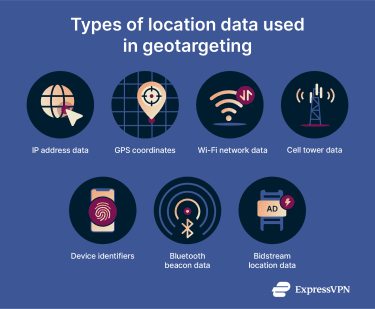
- IP address data: Location information inferred from a user’s IP address, typically identifying their country, region, or city, and sometimes their internet service provider (ISP).
- GPS coordinates: Highly precise latitude and longitude data generated by a device’s GPS system, commonly used in mobile apps to determine a user’s exact location.
- Wi-Fi network data: Location estimates based on nearby Wi-Fi networks, which can help refine where a device is.
- Cell tower data: Approximate location information derived from a device’s connection to nearby cellular towers.
- Device identifiers (device IDs): Unique identifiers tied to mobile devices that can be associated with location data over time, allowing platforms to recognize and potentially target returning users.
- Bluetooth beacon data: Proximity-based location data generated when a mobile device comes within range of a Bluetooth-enabled beacon, allowing highly localized targeting within physical spaces.
- Bidstream location data: Geographic details shared in real time during automated ad auctions, enabling advertisers to target users based on location.
How companies collect location data
Companies can obtain these kinds of location data through various technical and commercial mechanisms, including:
- Automatic network transmission: When users visit a website, their IP address is automatically transmitted and can be analyzed to estimate geographic location.
- User-permissioned location services: Mobile apps may request access to GPS or device location settings. If granted, this enables the collection of precise coordinates.
- Software development kit (SDK) integrations: Third-party SDKs embedded in apps may collect and transmit location-related data to service providers.
- Advertising exchanges and ad networks: During real-time bidding processes, geographic signals may be included in bid requests to enable targeted advertising.
- Proximity hardware systems: Retailers and venues may install Bluetooth beacons or similar Internet of Things (IoT) infrastructure to detect nearby mobile devices and enable proximity-based data collection.
- Third-party data providers: Organizations may acquire aggregated location data from data brokers that collect information across multiple digital properties.
Why geotargeting matters for privacy and cybersecurity
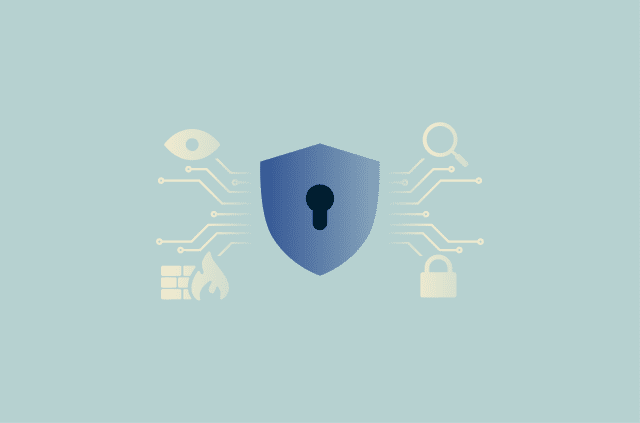
The risks associated with geotargeting don’t arise from the targeting mechanism itself but from the underlying collection and processing of location data, which is inherently sensitive.
Exposure of sensitive behavioral patterns
Individual location signals may seem limited on their own. However, when collected consistently over time, they can indicate recurring patterns, such as where someone regularly spends time, how they move throughout the day, and which locations they frequently visit. When analyzed over longer periods, even anonymized datasets can become more descriptive than intended.
Data aggregation and profiling
Geotargeting rarely operates in isolation. Location signals are often combined with browsing history, purchase behavior, demographic attributes, and device IDs. When aggregated, these datasets can expand the scope of user profiling beyond geographic segmentation alone, depending on how broadly data sources are integrated and analyzed.
Third-party data sharing
In geotargeting, location data frequently moves across advertising networks, analytics providers, and data brokers. As more entities gain access to geographic information, oversight becomes more complex and transparency more difficult for end users.
Security vulnerabilities and data exposure
Organizations that collect and store large volumes of location data may become attractive targets for cyberattacks. Improperly secured APIs, weak access controls, insider threats, or system misconfigurations can result in unauthorized access and data leaks. If exposed, detailed location histories could be used for stalking, harassment, phishing attacks, or other forms of exploitation.
Is geotargeting legal?
The legality of geotargeting depends on how location data is collected, processed, and shared. In many regions, precise location data can be considered personal data or personally identifiable information (PII), especially if it can be linked to a specific person or device.
In practice, it’s permitted when organizations handle location data in accordance with applicable privacy laws. For example, in the EU, the General Data Protection Regulation (GDPR) requires organizations to identify a lawful basis for processing location data, provide clear notice about its use, and respect user rights such as access and deletion.
In California, the California Consumer Privacy Act (CCPA) requires businesses to disclose how precise geolocation data is used and to give consumers the option to opt out of certain data sharing practices.
Geotargeting vs. geofencing: Key differences
These terms are often confused because both involve delivering content based on location data. The difference is that geotargeting is more dynamic and flexible. It targets users using a wide range of geographic details, such as cities, counties, or ZIP codes. It may also use extra data, like behavior or demographics, to further tailor the content people see.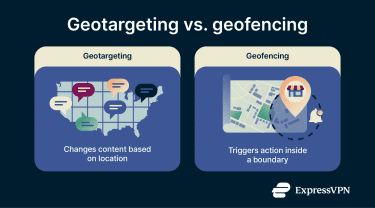
Geofencing, on the other hand, is more fixed. It works by setting up virtual boundaries, or fences, around a specific area, such as a city, neighborhood, or individual building. When someone enters or leaves that defined zone, it triggers preset actions, like showing an ad or sending a push notification.
Which poses a greater privacy risk?
In reality, both methods raise privacy concerns because they involve collecting detailed information about your location. Geofencing may seem slightly less invasive because it’s tied to fixed areas. In theory, you could reduce tracking by avoiding places you believe use this approach, but this isn’t really practical or even guaranteed to help.
Both data collection methods can also create security risks. Cybercriminals might exploit weak protections to break into databases that store sensitive location data gathered through geotargeting, then use that information in later attacks. Location-based triggers could also potentially be misused by malicious apps to alter their behavior based on a user’s location.
How to reduce or control geotargeting
You can’t completely stop geotargeting, but you can take steps to limit how much location data is collected. These include turning off unnecessary app location permissions, reducing online location tracking, and sending removal requests to data brokers. The sections below explain each of these tips in more detail.
Note: If you want to go beyond limiting geotargeting, there are additional steps you can take to come closer to deleting yourself from the internet.
Managing location permissions on devices
Many mobile apps ask for permission to access your location data, but you should carefully consider granting this permission to all applications. Does every app you use really need to know your current or past location? Granting location access to all apps can expose your location details to many companies and advertisers.
Check your device’s app permissions and make sure only apps that truly need location data have access. For example, a food delivery or ride-sharing app needs your location to function, but a single-player game usually doesn’t need to know where you are.
Note: For better protection, you should also optimize different Android privacy settings or iPhone privacy features.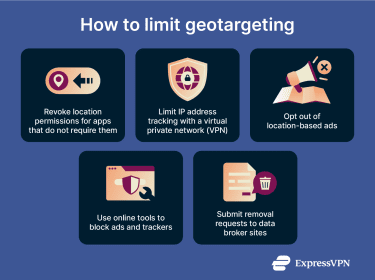
Reducing location tracking online
You can’t completely stop online location tracking, but you can take steps to limit how effective it is:
- Limit IP address tracking: One effective approach is to use a virtual private network (VPN), like ExpressVPN, which lets you connect to remote servers to change your IP. Basically, when you browse while connected to a VPN, many online services see the VPN’s IP instead of yours when collecting location details. However, keep in mind that a VPN doesn’t prevent apps or websites from collecting location data through GPS permissions, browser settings, or account information.
- Opt out of ads: Some online platforms let you opt out of targeted advertising, which can use your location data. For example, you can block Facebook ads to a certain extent by modifying ad preferences in your account settings.
- Block ads and trackers: Use an online tool to stop location-based ads from loading and prevent trackers from collecting location data. ExpressVPN users can turn on the Advanced Protection feature, which can block many display ads, pop-ups, and known tracking scripts from loading on your device.
Removing information from data broker sites
Data brokers aggregate lots of personal information, including location details, which can often be accessed by other businesses or, in some cases, members of the public. However, many such platforms also give you the option to manually remove your data.
This process usually means identifying which data broker sites hold your information, submitting removal requests, and waiting for each company to process them. It sounds simple, but it can quickly feel overwhelming because there are hundreds of active data broker platforms. On top of that, removing your details once doesn’t necessarily stop data brokers from collecting them again later, so you often have to repeat the process regularly.
You can also automate the removal process with a third-party service. For example, ExpressVPN’s Data Removal service allows eligible users in the U.S. to quickly find data brokers holding their information and request removal.
FAQ: Common questions about geotargeting
What data is collected for geotargeting?
Geotargeting collects multiple types of location data, like IP addresses, GPS coordinates, cell tower information, and Wi-Fi network data.
Can geotargeting be a security risk?
Geotargeting isn’t a threat on its own, but it does raise privacy and security concerns because it relies on location data collection. The level of risk largely depends on how that data is stored, shared, and protected. Weak security controls or excessive data retention can increase the potential for unauthorized access or misuse.
How is geotargeting different from geofencing?
Geotargeting and geofencing are related, but they operate in different ways. Geotargeting is more flexible because it uses a broad set of location details, such as a user’s country, state, city, or ZIP code, and may combine this with behavioral data when delivering content. Geofencing is more fixed since it involves creating virtual boundaries around a specific geographic area. When someone enters or leaves that area, preset actions are triggered, such as displaying an ad or sending a notification.
Can I opt out of geotargeting?
You can’t fully stop this type of data collection, but you can reduce geotargeting to some degree. You can manage app permissions so only apps that truly need your location have access, opt out of location-based ads on platforms that support this, use tools that change your IP address and block ads, and request the removal of your information from data broker sites.
Is geotargeting the same as being tracked?
For some people, geotargeting might feel like tracking because it collects lots of location data. It can log details such as a user’s country, region, state, city, and even ZIP code. This information comes from sources like IP addresses, GPS coordinates, Wi-Fi signals, and device identifiers (device IDs), which can feel intrusive. That data may also be combined with behavioral insights to deliver highly targeted content, such as personalized ads.
Take the first step to protect yourself online. Try ExpressVPN risk-free.
Get ExpressVPN