What is NTLM? Understanding this legacy authentication protocol



New Technology LAN Manager (NTLM) is a legacy authentication protocol from Microsoft that continues to appear in many Windows environments, often because of older applications or fallback configurations, even as more secure authentication methods have become standard.
This article explains what NTLM is, how it works, its security vulnerabilities, and how it compares to Kerberos.
What is NTLM authentication?
NTLM verifies a user’s identity through a challenge-response mechanism, avoiding the transmission of plaintext passwords over the network. It instead relies on password-derived hashes to control access to Windows-based resources.
NTLM exists in two main versions: NTLMv1 and NTLMv2. NTLMv1 is now considered obsolete, while NTLMv2 offers improved protections, though NTLM as a whole remains a legacy protocol.
The name “NTLM” reflects its origins and purpose:
- New Technology (NT): Refers to the Windows NT operating system family.
- Local area network (LAN): A historical naming reference rather than a strict technical limitation, reflecting early Windows networking concepts.
- Manager: Reflects its role in managing authentication and access.
Learn more: An in-depth guide on network connections.
How NTLM authentication works
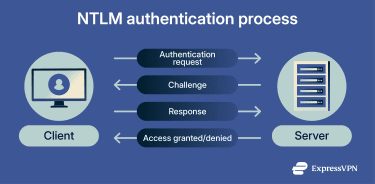
The challenge-response mentioned above is a security method in which a server sends a random challenge to a client, and the client proves its identity by generating a correct response using a secret (e.g., a password hash), without ever sending the secret itself.
- The user signs into their computer by entering the domain name, username, and password. The computer turns the password into a secure code, called a hash, and doesn’t store the actual password.
- When the user tries to access a network resource, the computer sends the username without NTLM-level encryption; however, it may still be protected by the underlying transport, such as Server Message Block (SMB) signing or Transport Layer Security (TLS).
- The server sends back a random number called a challenge.
- The computer uses the password hash to generate a response to the challenge and sends this response to the server.
- In domain environments, the server forwards the authentication data to a domain controller (a special server that stores password information) for verification.
- Password hashes are stored in separate databases based on account type. For local accounts, hashes are stored in the Security Account Manager (SAM). In domain environments, hashes are stored in the Active Directory (AD) database file (NTDS.dit), Microsoft’s directory service used to manage users, computers, and resources in a Windows network.
- When authenticating a domain user, the domain controller uses the username to retrieve the stored password hash from NTDS.dit and uses it to verify the challenge-response.
- If the domain controller’s computed response matches the user’s computer’s response, the user is successfully authenticated.
Why NTLM is considered insecure today
NTLM's reliance on reusable password-derived hashes makes it vulnerable to pass-the-hash and NTLM relay attacks.
Weaknesses in legacy authentication protocols
Legacy protocols like NTLM often prioritize compatibility and simplicity over modern security defenses. NTLM is primarily retained as a fallback when newer authentication methods fail or aren't supported by older systems or applications, highlighting the importance of reducing its use whenever possible.
Microsoft encourages transitioning away from NTLM and actively recommends Kerberos as the preferred authentication method, while also recommending measures to restrict or block NTLM where possible.
Known NTLM vulnerabilities
- Lack of mutual authentication: NTLM only authenticates the client to the server, but the server is not verified back to the client. This opens the door to certain types of impersonation or interception risks.
- Weak cryptographic algorithms: NTLMv1 uses outdated cryptographic methods, including Data Encryption Standard (DES)-based operations, which are vulnerable to modern cracking techniques. NTLMv2 improves on this but remains a legacy protocol with known weaknesses.
- Username sent without NTLM-level encryption: The username is transmitted over the network without NTLM-level encryption during authentication, potentially exposing user identities to eavesdropping.
- Dependence on password hashes: NTLM uses reusable password-derived hashes rather than actual passwords, which can be abused in pass-the-hash attacks if those hashes are compromised.
While Microsoft has strengthened default settings and added protections, such as reducing NTLM relay risks and allowing NTLM blocking in certain contexts, such as SMB and TLS, these measures don’t make NTLM fully secure.
Common attacks targeting NTLM
Attackers target NTLM because it exposes reusable authentication material that modern protocols seek to protect. NTLM isn’t cryptographically broken in all cases, but its design limitations create increased risk, especially on internal networks where attackers aim to move laterally.
In many intrusions, attackers begin with network discovery, mapping devices and services before attempting credential-based access. Two attack patterns frequently observed in incidents and security guidance are NTLM relay and pass-the-hash.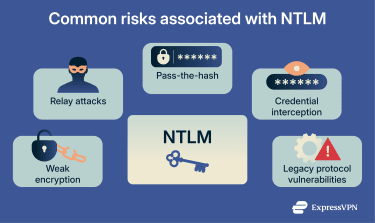
NTLM relay attacks explained
An NTLM relay attack falls under the man-in-the-middle (MITM) style attack. Instead of cracking a password, an attacker intercepts an NTLM authentication attempt and relays it to another service that accepts NTLM, hoping the service will accept the forwarded authentication as legitimate.
Microsoft’s guidance on mitigating NTLM relay focuses on binding authentication to the intended server and hardening the services that accept NTLM. Measures such as Extended Protection for Authentication (EPA) and signing features (such as SMB signing) are key ways to reduce NTLM relay risk when NTLM can't yet be fully eliminated.
Credential interception and pass-the-hash risks
Pass-the-hash is a technique where attackers use stolen password hashes to authenticate to remote systems without needing plaintext passwords.
This is particularly problematic with NTLM, which relies on password-derived hashes. If an attacker steals NTLM hashes from a compromised machine, and those credentials are valid elsewhere, it enables lateral movement across internal systems.
Microsoft emphasizes reducing NTLM usage, hardening services that still accept it, and auditing authentication activity to identify and phase out NTLM, thus lowering the risk that intercepted credentials are reused across the network.
When is NTLM still encountered?
Although NTLM is no longer the preferred authentication protocol, it still appears in many environments where older systems or configurations rely on it for compatibility, or where Kerberos can’t be used. Microsoft acknowledges this reality by continuing to support NTLM while encouraging organizations to monitor and gradually reduce its usage.
Legacy systems and applications
NTLM is frequently found in older systems and applications developed before Kerberos became the default authentication method in Windows domains. These legacy systems may lack Kerberos support entirely or depend on NTLM-specific behaviors that are challenging to replace without upgrading or redesigning the application.
This situation is common in long-standing enterprise environments where legacy software remains operational. Microsoft acknowledges that NTLM authentication is often left enabled to avoid breaking these older dependencies, even though it’s no longer recommended as the primary authentication method.
Compatibility and transitional scenarios
NTLM also appears as a fallback in otherwise modern environments. For example, if a device can’t contact a domain controller, a service is misconfigured, or authentication occurs outside an AD context, Windows or the application may revert to NTLM. This fallback behavior explains why NTLM can sometimes surface unexpectedly in modern setups.
Because of these transitional scenarios, Microsoft advises auditing NTLM usage before disabling it. Identifying where and why NTLM is still used helps organizations address compatibility gaps and reduce the risk of authentication failures during migration to Kerberos.
NTLM vs. Kerberos
NTLM and Kerberos both handle authentication in Windows environments but are built on different assumptions. NTLM focuses on proving knowledge of a password through a challenge-response mechanism.
By contrast, Kerberos relies on a centralized, ticket-based system designed for modern networks. This fundamental difference influences how credentials are handled, how attacks play out, and how well each protocol scales in enterprise environments.
Microsoft positions Kerberos as the default and preferred authentication protocol for AD.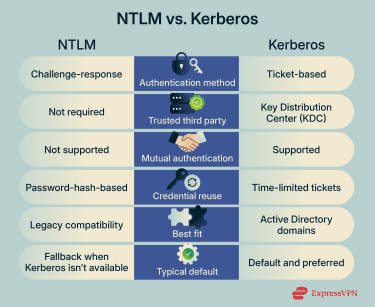
Key differences between NTLM and Kerberos
Authentication mechanisms
As we mentioned above, NTLM authenticates users with a challenge-response exchange that relies on password-derived hashes. Each authentication attempt is largely independent, and the protocol doesn’t depend on a central authority to issue reusable credentials.
Kerberos works differently. It relies on a trusted third party called a Key Distribution Center (KDC), which is typically a domain controller in Windows environments. The KDC issues time-limited tickets after a user logs in. These tickets can be used to access multiple services without repeatedly sending credential information.
This ticket-based approach enables single sign-on and reduces the frequency with which sensitive authentication data is transmitted across the network. It’s one reason Kerberos scales better in large environments.
Security implications
From a security perspective, the differences are significant. Because NTLM relies on reusable password hashes, intercepted or stolen hashes can enable pass-the-hash and relay attacks. The protocol also doesn’t provide mutual authentication, meaning the client doesn’t verify the server’s identity.
Kerberos reduces these risks by using encrypted tickets, enforcing time limits, and supporting mutual authentication between clients and services. Tickets expire automatically, limiting how long stolen credentials can be abused. This design makes Kerberos more resistant to replay-style attacks and better suited for integration with modern security controls.
Why organizations are migrating to Kerberos
While NTLM persists in many environments, organizations increasingly recognize the need to phase it out because of its inherent security risks.
As part of this shift, Microsoft has deprecated NTLM, notably disabling and removing NTLMv1 in recent Windows releases, including Windows 11 24H2 and Windows Server 2025, while continuing to discourage NTLM use overall.
Reducing authentication risks in modern networks
Most organizations approach NTLM reduction as a phased effort, first gaining visibility into where NTLM is used before restricting it. Key steps include:
- Auditing NTLM usage: NTLM auditing helps show which systems and services still rely on it before changes are made, reducing the chance of breaking legacy workflows unexpectedly.
- Blocking NTLM where it's not needed: Modern Windows versions allow restricting or blocking NTLM for specific services, such as SMB, reducing exposure to common attack paths.
- Hardening services that still accept NTLM: Features like SMB signing and EPA help reduce the risk of relay attacks when NTLM can’t be removed immediately.
- Prioritizing Kerberos-capable configurations: Correct Domain Name System (DNS), service principal names, and stable domain connectivity help reduce NTLM fallback and keep authentication on Kerberos by default.
- Planning for long-term removal: Microsoft’s roadmap makes it clear that NTLM is being phased out. Many teams treat the NTLM security protocol as technical debt rather than a permanent solution, which helps guide safer authentication decisions.
FAQ: Common questions about NTLM
Is NTLM still used in modern systems?
Yes. New Technology LAN Manager (NTLM) is still supported in Windows and can still be encountered in environments such as workgroup setups, local logons, and compatibility scenarios where Kerberos is unavailable or not in use. Even today, NTLM is still used whenever Windows has to fall back to older authentication mechanisms.
Why is Kerberos more secure than New Technology LAN Manager (NTLM)?
Kerberos is built around a ticket-based model, which reduces repeated exposure of password-derived credentials and supports stronger controls such as mutual authentication. Microsoft documentation positions Kerberos as the preferred authentication protocol for Active Directory (AD) environments.
Is NTLM authentication encrypted?
New Technology LAN Manager (NTLM) uses a cryptographic challenge-response approach to authenticate a user without sending the password over the wire. That said, NTLM doesn’t automatically mean your whole connection is encrypted. NTLM Windows authentication can negotiate “session security” (signing and sealing) in some cases, but encryption depends on the application and the negotiated settings.
What risks are associated with New Technology LAN Manager (NTLM) today?
Two main risks include pass-the-hash, in which stolen password hashes are reused to authenticate and move laterally without the plaintext password, and NTLM relay, in which an attacker forwards an NTLM authentication exchange to another service to gain access.
Can I turn off New Technology LAN Manager (NTLM) authentication?
In managed environments, you can restrict or block NTLM using Windows security policy settings. Microsoft provides policies to audit incoming NTLM traffic first (to see what depends on it), and separate policies to restrict incoming NTLM traffic by allowing or denying NTLM in different scopes.
Take the first step to protect yourself online. Try ExpressVPN risk-free.
Get ExpressVPN