Types of VPNs: Complete guide to VPN categories and protocols


All virtual private networks (VPNs) work on the same principle: they encrypt your internet traffic and route it through a secure server. Where they differ is in how they’re designed to be used. Some VPNs are built to connect entire business networks, while others focus on protecting individual devices and everyday internet activity.
These differences define the main types of VPNs, which are variations designed for different environments, not entirely different tools. Below, we’ll break down the most common VPN types, how they’re typically used, and which one is right for you.
What are the different types of VPNs?
All VPNs fall into one of two architectures: remote access VPNs and site-to-site VPNs. Here’s a quick overview:
| Remote access VPN | Site-to-site VPN | |
| What does it connect? | An individual device to a VPN server or private network | Two or more entire networks |
| Who uses it? | Individuals and remote workers | Mainly businesses/organizations and their employees |
| Common uses | Encrypting internet connections, connecting to private networks remotely, hiding IP addresses | Linking office networks or data centers securely |
| Typical setup | VPN app | Network hardware or gateways |
Remote access VPNs
A remote access VPN lets a single device connect to a VPN server or private network over the internet.
How a remote access VPN works
- You connect using a VPN app or client. This creates a secure, encrypted tunnel between your device and a chosen VPN server.
- Your device is assigned a new IP address from the VPN server, which makes your online traffic look like it’s coming from that server’s location.
- As long as the VPN is functioning correctly, it protects all internet traffic from outside observers. The only entities with access to the decrypted traffic are the VPN provider or, in the case of a work VPN, the private network you’re connecting to. Many personal VPNs adhere to no-logs policies, where your traffic data is neither stored nor shared with third parties.
Types of remote access VPNs
The capabilities and features of remote access VPNs can differ significantly. Here are the main categories:
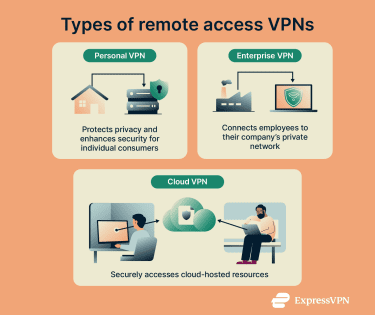
Personal VPNs
Personal VPNs, also known as consumer VPNs, are built for everyday internet use. They usually prioritize ease of use, privacy-focused features, and large server networks, often spread across numerous countries. Many personal VPNs are positioned as tools you can always leave on, and some are designed to minimize the impact on your internet speeds so that they don’t interfere with your online activities.
These consumer-focused VPNs typically support a wider range of devices and operating systems, with apps for desktops, mobile devices, smart TVs, and even routers. ExpressVPN is an example of a personal VPN.
Common uses:
- Protecting data on public Wi-Fi.
- Hiding your IP address and browsing activity from third parties.
- Appearing as if you’re browsing from another location.
Enterprise VPNs
An enterprise VPN gives employees secure remote access to their company’s private network. This may include access to internal files, applications, databases, and other resources.
In these setups, the company uses a dedicated VPN server, either on its own infrastructure or as an isolated setup through an enterprise VPN vendor. Employees connect to this server using company-issued credentials. Once authenticated, they’re assigned an internal IP address.
Unlike consumer VPNs, which route user traffic through servers that are shared with other customers, enterprise VPNs are designed to integrate with a company’s private infrastructure.
Common uses:
- Giving remote workers access to internal company resources.
- Secure file sharing and collaboration.
- Protecting sensitive communications between employees and the company network.
Cloud VPNs
A cloud VPN provides secure connections between remote users and an organization’s resources in the cloud. It’s a type of enterprise VPN, but it specifically allows access to a company’s cloud setup.
Unlike traditional hardware-based solutions, cloud VPNs offer rapid deployment, scalability, and flexibility.
Common uses:
- Secure remote access to cloud‑hosted applications and data.
- Connecting cloud environments with on‑site networks.
- Providing scalable resources to distributed teams.
Site-to-site VPNs
A site-to-site VPN connects entire networks, allowing them to communicate securely. Organizations primarily use site-to-site VPNs to connect branch offices, data centers, or partner networks, creating a single, secure network environment.
How a site-to-site VPN works
- Each network has a gateway device (such as a router or firewall) that manages the VPN connection.
- The gateways establish an encrypted tunnel across the internet, typically with the protocol Internet Protocol Security (IPSec).
- Gateways authenticate one another before sending traffic.
- Traffic between the sites is routed through the tunnel. Devices on one network can communicate with those on the other as if they were on the same local area network (LAN).
- Users typically don’t install a VPN client; the gateway handles the encryption and tunneling of traffic.
Common uses for site-to-site VPNs
- Companies with branches in different cities or countries can link their networks, allowing employees to access resources from other sites.
- Organizations with separate data centers can securely back up data or share applications between sites.
- Businesses can securely connect to the networks of partner companies without exposing sensitive data over the public internet.
VPN protocols: Comparison of the most common VPN technologies
VPNs use tunneling protocols to establish how data is packaged and sent over the internet. These protocols allow VPNs to encrypt data, authenticate users, and perform integrity checks.
Below is a comparison of the most common VPN protocols:
| Protocol | Strengths | Trade‑offs |
| Lightway | Fast connection setup; stable across network changes; open‑source with post‑quantum design | Proprietary to ExpressVPN |
| OpenVPN | High security and flexibility | Slower performance than some other options |
| WireGuard | Very fast and efficient | Simpler feature set; UDP-only, no native enterprise management tools |
| IPsec/IKEv2 | Strong security due to robust encryption and authentication | Can be complex to configure |
| L2TP/IPsec | Widely supported; built into major operating systems | Slower due to double encapsulation; sometimes has problems with firewalls |
| SSL/TLS‑based VPNs (SSTP) | Works in environments with restrictive firewalls | Often limited to specific platforms |
| PPTP | Easy to use and fast | Weak security; outdated |
How VPN protocols work
VPN protocols define how a secure connection is established and maintained. Here’s what they do:
- Set up a tunnel between your device and the VPN server.
- Specify how data is encrypted.
- Govern authentication between the client and the server.
- Determine how securely and efficiently data travels through the tunnel.
Common protocols explained
VPN protocols often differ in how they work, and some are better suited to certain use cases than others. Here’s a quick overview of the most common VPN protocols and how they work.
Lightway
Lightway is ExpressVPN’s proprietary VPN protocol designed to be lightweight and efficient. It supports both User Datagram Protocol (UDP) and Transmission Control Protocol (TCP), allowing it to connect quickly and function on networks where UDP may be restricted.
Unlike some protocols that drop connections during network changes or device sleep, Lightway maintains the connection by entering an idle state and reconnecting promptly, which helps reduce interruptions, particularly on mobile devices. The protocol also integrates quantum-resistant encryption, which aims to protect your data against future advances in computing power.
OpenVPN
OpenVPN is one of the most widely used VPN protocols. Its open-source code allows for independent review, helping ensure strong security. OpenVPN is also viewed as dynamic since two versions are available: TCP and UDP. OpenVPN TCP is generally more reliable, while OpenVPN UDP prioritizes faster speeds.
WireGuard
WireGuard is a newer VPN protocol designed for simplicity and fast speeds. It uses the ChaCha20 encryption algorithm and has a minimal code base, which improves its performance and makes audits easier to perform. WireGuard’s combination of strong security and efficiency has led to its rapid adoption in both consumer and enterprise environments.
IPsec/IKEv2
Internet Protocol Security (IPsec) is a suite of standards that authenticates and encrypts IP traffic between devices. Internet Key Exchange version 2 (IKEv2) is often used with IPsec to negotiate secure sessions and automatically re‑establish them after disruptions like network changes. This makes it especially effective for mobile users who are frequently switching between Wi‑Fi and cellular networks.
L2TP/IPsec
Layer 2 Tunneling Protocol (L2TP) creates the tunnel for VPN traffic but doesn’t encrypt data on its own. It’s almost always paired with IPsec to provide encryption and to protect data integrity. Because this combination wraps your data in extra layers for security, it tends to be slower than more modern protocols.
SSL/TLS‑based VPNs (e.g., SSTP)
Secure Sockets Layer (SSL) / Transport Layer Security (TLS) is the same technology that secures HTTPS websites. Protocols built on this can establish encrypted tunnels that are difficult for firewalls to block. Microsoft’s Secure Socket Tunneling Protocol (SSTP) is one example that integrates SSL/TLS into VPN connections, and it’s commonly used in Windows environments.
PPTP
One of the oldest VPN protocols, Point‑to‑Point Tunneling Protocol (PPTP) was widely used in the early days of VPNs because it’s fast and simple to set up. However, its security is now considered weak by modern standards, and it’s generally not recommended if you wish to protect sensitive data.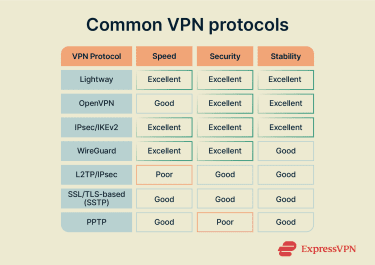
How to choose the right VPN
Here are the key criteria to consider when deciding on a VPN:
- Identify what you need the VPN for: If you’re an individual, a consumer VPN designed to protect personal internet connections will typically suffice. For businesses, it’s important to evaluate whether you need enterprise solutions, cloud VPNs, or site-to-site VPNs to securely connect multiple locations or users.
- Consider security and encryption requirements: Look for VPNs that use strong encryption standards, such as Advanced Encryption Standard (AES) with 128-bit or 256-bit keys, and trusted protocols like OpenVPN, WireGuard, or Lightway. While some protocols or lower-bit encryption settings might offer marginal speed improvements, the difference is generally minimal, and prioritizing strong security is recommended.
- Evaluate performance and stability needs: If you plan to use a VPN for bandwidth-intensive activities like streaming or gaming, ensure it provides fast, stable connections. Many VPN providers offer free trials or money-back guarantees that allow you to test speeds before committing.
- Check device and platform compatibility: Make sure the VPN supports all the devices and platforms you use, such as Windows, macOS, Android, iOS, and even routers. You’ll also want to see how many simultaneous connections it allows if you’re looking to protect several devices.
- Think about scalability and management: If you need a VPN for a growing team or business, consider how easily the VPN can scale and be managed across multiple users or locations. Many enterprise VPNs have admin dashboards, centralized management features, and policy controls to simplify setup and ongoing administration.
Tools often mistaken for VPNs
These tools share some similarities with VPNs, but they work in different ways.
Remote Desktop Protocol (RDP)
Remote access VPNs are sometimes confused with RDP, but they serve different purposes. A remote desktop tool lets you control another device remotely, while a remote access VPN securely connects your device to a network through an encrypted tunnel.
Learn more: RDP vs. VPN
Proxy servers
Proxies act as an intermediary between your device and the internet. Like VPNs, they can hide your IP address by routing traffic through a remote server. However, while some proxies offer encryption for certain applications, they don’t typically provide the same comprehensive protection as a VPN, which encrypts all internet traffic from your device.
Learn more: Proxy vs. VPN
VPN browser extensions
These are extensions associated with VPNs. They typically only work within the browser itself, meaning any traffic outside of your browser (like apps or other services) won’t be protected. That said, some VPN browser extensions can function as remote controls for the VPN application that goes with them.
For example, ExpressVPN's browser extension can control the ExpressVPN app to protect your entire device, or it can run in Proxy Mode and protect only browser traffic.
The Onion Router (Tor)
Tor is a free, open-source tool that allows you to browse the internet (including the dark web). It aims to anonymize your internet traffic by routing it through several volunteer-operated servers with multiple layers of encryption.
The Tor browser is not designed for device-wide security since it only protects traffic through its browser. Furthermore, Tor can be much slower than VPNs due to the way traffic is routed through multiple nodes.
Learn more: Tor vs. VPN
Smart DNS
Smart Domain Name System (DNS) is a technology that works by rerouting your internet traffic through a remote server to alter your device’s DNS settings. Smart DNS can make it appear as though you're accessing the internet from a different location by altering the DNS server your device uses to resolve domain names. However, it does not change your IP address or provide encryption.
Learn more: DNS vs. VPN vs. Smart DNS
FAQ: Common questions about types of VPNs
What are the main types of VPN?
The two core VPN architectures are remote access and site-to-site VPNs. Remote access VPNs connect individual devices to a network and are commonly used for personal privacy, mobile access, or securely connecting remote employees to company resources. Site-to-site VPNs link entire networks together, such as multiple office locations, creating a secure tunnel for all network traffic. Within these categories, there are specialized types like personal, enterprise, and cloud VPNs, each designed for specific use cases.
Which VPN is best for me?
For most individuals, a personal VPN is the best choice. It protects your privacy online, secures connections on public Wi-Fi, and is typically optimized for fast, reliable performance across everyday internet activities. Personal VPNs often work on various devices, including desktops, smartphones, smart TVs, and sometimes even routers.
For work or business purposes, an enterprise, cloud, or site-to-site VPN may be more appropriate. Enterprise VPNs can provide secure remote access for employees, cloud VPNs deliver secure access to cloud-hosted resources, and site-to-site VPNs connect multiple networks.
Can I use more than one VPN at once?
Technically, it’s possible to run multiple VPNs simultaneously, but it can be complex and may cause conflicts or slow your connection. Most users get the security and privacy they need with a single VPN, and using more than one is usually only necessary for specialized setups.
Is it safe to combine VPN protocols?
Most VPNs only allow you to use one protocol at a time. While many VPNs offer a choice of protocols (such as Lightway, OpenVPN, WireGuard, or IKEv2), combining them isn’t typically possible or recommended. Switching between protocols for different use cases is safe, but running more than one simultaneously can cause conflicts and negatively impact security or performance.
How do encryption types vary by VPN?
VPNs use different encryption algorithms and key lengths to secure data, which can affect security and performance. Common encryption standards include Advanced Encryption Standard (AES), typically with 128-bit or 256-bit keys, with 256-bit AES being the strongest widely used standard today. Some VPN protocols, like OpenVPN and Lightway, use AES-256 by default, while others may support multiple options.
Other protocols may use alternative algorithms, such as ChaCha20 in WireGuard, which is designed for speed and security on devices without hardware acceleration for AES. The choice of encryption impacts how well your data is protected and how fast the VPN connection performs, but modern VPNs generally balance strong encryption with good performance.
What is a hybrid VPN solution?
A hybrid VPN combines the two main types of VPNs: site-to-site and remote access. It provides secure connections between multiple office locations (site-to-site) while also allowing individual users to securely access a private network remotely (remote access). Businesses often use this solution to secure inter-office communication and provide remote employee access to internal resources.
Take the first step to protect yourself online. Try ExpressVPN risk-free.
Get ExpressVPN













 Support Center
  Live Chat
  FAQ
FAQ 


