Expressvpn Glossary
DNS zone

What is a DNS zone?
A DNS zone is a portion of the internet’s Domain Name System (DNS) managed by a specific person or organization. It contains all the DNS records for those names, and the administrator can control how they point to websites or services without affecting other parts of the DNS system.
How does a DNS zone work?
A DNS zone works in the following way:
- Zone file stores resource records: DNS keeps the details for a zone in a plaintext zone file that lists all the resource records, like IP addresses, mail servers, and name servers.
- Authoritative server answers zone queries: Servers that host the zone file act as authoritative DNS servers and reply with the correct answer when a user initiates a DNS request for a domain in that zone.
- Delegation splits parent and child zones: When a bigger zone hands off control of a subdomain, it uses delegation, so the parent and child zones work separately with their own authoritative servers.
- Zone transfers replicate between servers: Secondary DNS servers copy the zone file from the primary server, so every server has the same information.
- DNSSEC signs zone records: If a zone’s authoritative server supports DNS Security Extensions (DNSSEC), the server adds digital signatures to the zone’s records so resolvers can check they haven’t been tampered with.
Types of DNS zones
DNS zones can be categorized by how they’re hosted and replicated in the following way:
- Primary zone: Holds the main, editable copy of all DNS records for a domain. Administrators make updates here first, and those changes then spread to other servers.
- Secondary zone: Holds a read-only copy of a primary zone (or another secondary zone) to share the work of answering queries and give backup if the primary server goes down.
- Stub zone: Stores just enough information to point a DNS server to the authoritative servers for the zone, helping it resolve names more efficiently.
DNS zones can also be categorized based on the type of lookup they support:
- Forward lookup zone: Maps domain names (like example.com) to IP addresses so browsers and other tools can find the right computer on the internet.
- Reverse lookup zone: Opposite of a forward lookup; maps an IP address back to a domain name, which helps with troubleshooting.
Why is a DNS zone important?
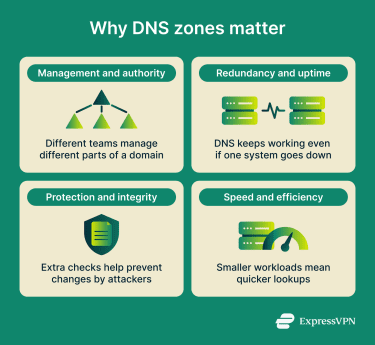
Every time someone visits a website, sends an email, or uses an online service, DNS zones help ensure that domain names are resolved accurately and securely. Key benefits include:
- Control and delegation: Zones let administrators decide who manages specific parts of a domain, so they can update records or delegate subdomains without affecting other areas.
- Reliability: By having backup or secondary zones, DNS can keep answering queries even if one server fails, improving uptime for websites and services.
- Security: Zones can include security features like restricted access and DNSSEC signatures, which help protect against tampering and attacks.
- Performance: Breaking the DNS namespace into zones reduces the workload on any single server and speeds up name lookups, making services quicker and more responsive.
Risks and privacy concerns
DNS zone misconfigurations and weak controls introduce serious risks that can compromise both security and reliability. These include:
- Zone transfer leakage: A misconfigured DNS server may respond to unauthorized zone transfer requests, revealing internal network structure, hostnames, and other potentially sensitive information to attackers.
- Misrouting and downtime: Old or outdated DNS zone records can send users to the wrong places or fail to resolve at all.
- DNS spoofing: If DNS zones lack security extensions like DNSSEC, attackers can forge DNS responses and trick users into visiting harmful sites.
- Record tampering: When admins don’t control who can change DNS zone settings, attackers can tamper with records and compromise a domain’s integrity.
Further reading
- DNS record types explained: A complete guide for privacy
- Types of DNS servers: Everything you need to know
- Complete guide to understanding managed DNS
- DNS security: How to protect your network from DNS threats
- What is DNS, and how does it work?