How to stop spam with anonymous email forwarding


Spam often starts with a simple signup. Every time you enter your email address for a purchase, newsletter, or online account, it gets stored in another database. If that database is shared, sold, or exposed in a breach, your address can quickly end up on spam lists or phishing campaigns.
Anonymous email forwarding helps reduce that risk. Instead of giving out your real email address, you create aliases that forward messages to your inbox. If one of those aliases starts receiving spam, you can disable it without affecting your main email address or other accounts.
This guide explains how anonymous email forwarding works, how it protects your privacy, and how to use it to reduce spam and limit email-based tracking.
What is anonymous email forwarding?
Anonymous email forwarding is a service that lets you create alternative email addresses (aliases) that automatically forward messages to your real inbox. When someone sends an email to your alias, you receive it in your normal inbox, but the sender only sees the alias, not your primary address.
For example, you sign up for an online store using john-storename@alias.com. The store only knows that alias. If the company shares it with marketers or suffers a data breach, only the alias is exposed. Your real email address, the one tied to your personal contacts, work, and bank, stays private.
How anonymous email forwarding works
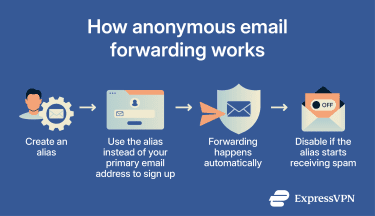
Here’s how the anonymous email forwarding process typically works.
- Sign up: Register with an anonymous email forwarding provider. Most require only a primary email address and account credentials.
- Create an alias: The provider generates a unique, randomized, or customizable email alias for you.
- Receive emails: When you use the alias to sign up for a website, emails sent to that alias first go to the forwarding provider, which then routes them to your real inbox.
- Send and reply anonymously: Advanced email privacy tools like ExpressMailGuard also support reply masking. When someone emails your alias, the service forwards the message to your inbox. If you reply, your response is routed back through the relay, which rewrites the sender address so the recipient only sees your alias, not your real email address.
- Disable an alias: If an alias begins receiving spam or suspicious mail, you can deactivate or delete it. Messages to that address stop immediately, without affecting your other aliases or your main inbox.
How your email address gets exposed
Your email address rarely spreads because of a single event. More often, it accumulates exposure over time as you sign up for services, make purchases, and interact with online platforms.
Here are some of the most common ways email addresses end up circulating beyond their original purpose.
- Account registrations and online purchases: Most websites require an email address to create an account, confirm orders, or send receipts. That information may remain in the company’s databases for years. If the company shares data with partners, advertisers, or analytics providers, your address can spread further than expected.
- Data breaches: Companies regularly suffer data breaches that expose customer information, including email addresses. Once leaked, that data often appears in breach databases or is traded on underground forums. Attackers can then use the addresses for spam campaigns, phishing attempts, or credential stuffing attacks.
- Marketing data sharing and brokers: Some companies share or sell customer information to marketing partners or data brokers. These brokers combine data from multiple sources to build detailed consumer profiles, which can include your email address alongside other personal information.
- Public listings and contact forms: Publishing your email address on a website, forum profile, or business listing can make it easier for automated bots to collect it. Spammers often scan the web for exposed addresses to add to mailing lists.
Benefits of using anonymous email forwarding
Anonymous email forwarding reduces spam by changing your exposure.
- Limits long-term exposure: Using aliases for each service means your primary email address stays out of marketing networks and breach databases.
- Reveals data leaks: Say you use john-storename@alias.com for an online retailer, and that alias suddenly starts receiving unrelated marketing; you know exactly which company shared or sold your address.
- Turns spam into a manageable problem: The key advantage is control. Instead of filtering spam forever, you remove the exposed address.
- Reduces cross-platform profiling: Using separate aliases makes it much harder for advertisers and brokers to connect your activity across services.
- Improves inbox organization: Dedicate one alias to shopping, another to newsletters, and another to work-related signups. This separation makes filtering easier and keeps your primary inbox cleaner.
Read more: Email forwarding is just one way to cut down on spam. This guide covers other steps you can take to keep your inbox cleaner.
Anonymous email forwarding vs. other privacy tools
Several privacy tools can help protect your real email address, but they work in different ways and provide varying levels of privacy.
Anonymous email forwarding vs. disposable email addresses
Disposable email addresses are temporary inboxes that self-destruct after a set time. They’re useful for short-term use, like one-time sign-ups, but aren’t suitable for long-term accounts or recovery emails.
Some disposable email services use public, browser-based inboxes, meaning they’re not suitable for sensitive communication. They prioritize convenience and anonymity over durability.
Email aliases (forwarding), on the other hand, are tied to your primary inbox and benefit from your provider’s security features.
Anonymous email forwarding vs. encrypted email
These tools solve different problems. Anonymous email forwarding helps protect your identity by hiding your primary email address, while encryption protects the contents of the message itself.
Many forwarding services use standard Transport Layer Security (TLS), which protects data while it travels through the network. However, messages aren’t end-to-end encrypted by default, meaning the provider can technically see the content as it passes through their servers.
End-to-end encryption (E2EE) makes the message unreadable to anyone except the intended party. It protects against interception but doesn’t hide your email address from the recipient.
Anonymous email forwarding vs. virtual private networks
A virtual private network (VPN) masks your IP address and encrypts your network activity. Anonymous email forwarding masks your email address. They solve different problems:
- VPN: Hides your IP from websites, encrypts your internet traffic, and reduces IP-based tracking.
- Anonymous email forwarding: Hides your inbox from websites and reduces email-based tracking and spam.
To get the strongest privacy, use both. ExpressMailGuard is built by ExpressVPN, and you get both tools with the same subscription. Using them together to mask both your IP and your email address covers two of the most common tracking vectors without managing separate services.
How to choose the right anonymous email forwarding service
Your security depends on your provider. They don’t all offer the same level of privacy and control. Here are some factors to consider when choosing an anonymous email forwarding service:
- Transparent logging policy: Understand what metadata the service stores and for how long. Providers should limit metadata logging to what’s technically necessary for delivery and abuse prevention.
- Alias limits: How many aliases can you create? Avoid services that only offer one or two aliases, as this defeats the purpose of using multiple aliases to compartmentalize signups.
- Easy alias management: You should be able to easily create, disable, and label aliases, ideally all from a single dashboard.
- Reply masking: An essential feature for two-way communication without revealing your primary email address.
- Email authentication: Look for protocols like Sender Policy Framework (SPF) or DomainKeys Identified Mail (DKIM) that help reduce delivery failures and protect against phishing, spam, and other unauthorized emails.
Anonymous email forwarding best practices
Anonymous email forwarding works best when you treat aliases as part of a broader privacy strategy rather than a one-time fix. The goal is control and compartmentalization.
- Use a clear naming structure: Pick a consistent naming system and stick with it. For example, a format like john-service@alias.com makes it obvious where you used each alias.
- Use one alias per service: Each service should get its own alias. Don’t reuse aliases across services. Dedicated alias tools can simplify this process. Services like ExpressMailGuard track which website each alias was created for, making it easier to audit and disable addresses that are no longer needed.
- Audit regularly: Set a calendar reminder (for example, quarterly or twice a year) to review your aliases. Disable aliases for services you no longer use. Decreasing your active alias count shrinks your attack surface.
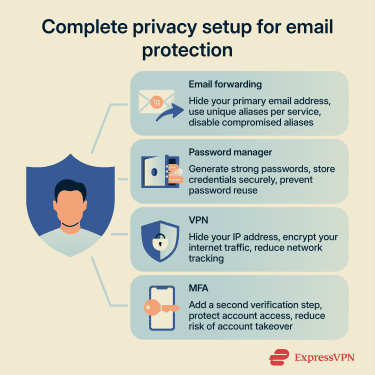
- Secure your primary inbox: Use strong passwords (stored in a password manager such as ExpressKeys) and enable multi-factor authentication (MFA) whenever possible.
- Combine with other privacy tools: Aliases protect your email identity, but they don’t secure everything. For sensitive information, pair forwarding with encrypted email services. Use a VPN to limit IP address tracking.
FAQ: Common questions about anonymous email forwarding
Is anonymous email forwarding legal?
Can I reply from my anonymous email address?
Does anonymous email forwarding stop spam completely?
Does email forwarding work with attachments?
Is anonymous email forwarding better than a VPN for email privacy?
Take the first step to protect yourself online. Try ExpressVPN risk-free.
Get ExpressVPN







 Support Center
  FAQ
FAQ  VPN Setup Tutorials



Comments
Why not Firefox aliases ? Very private, safe and easy to use as they’re integrated to your browser.
how about how to get a ph# that is an alias so that googllllle/youtubr cant trace you to a credit card when trying to signup for an account!!!
The problem is that the s*** face marketers, and their f****** brainless web developer boy-toys are finding and blocking all of the great services like those discussed here. So when you try to sign up for things and use a service designed to protect your real e-mail address, you get error messages saying you are using an invalid e-mail. This pretty much puts us back in the boat of having to create new e-mail accounts. Or...refuse to do business with anybody who blocks your e-mail service. And let them know that's why you are not making your purchase from them. Maybe the a** h**** will get a clue if enough of us say "no".