 Celebrate with up to 80% off
Tinder bots: How to spot fake matches and stay safe



Not every match on Tinder is a real person. Some profiles are automated accounts, called bots, designed to start conversations and quickly push you toward scams, suspicious websites, or handing over personal information.
The warning signs can be subtle at first. But once you know what to look for, they become easier to recognize.
What are Tinder bots?
Tinder bots are automated accounts controlled by software rather than a real person. They can swipe, match, and send messages using prewritten scripts or simple decision rules, all without anyone sitting at a keyboard.
At first glance, these profiles look completely normal. They usually include photos, a short bio, and a few basic details. The conversation, at least for the first few messages, may feel fairly natural. The difference is in how they behave after that.
First, it helps to distinguish bots from fake profiles, since they're often confused:
- Fake profiles: Controlled by a real person pretending to be someone else. Conversations tend to feel more natural and adaptive.
- Tinder bots: Run on scripts or automation tools. Replies are triggered automatically and often don't fully match the conversation.
Bots tend to break down faster when you ask something unexpected, while human-operated scams can adapt and continue longer. However, bots are much more efficient than human scammers: unlike a real user, a bot can run the same interaction across hundreds of accounts at once.
What are Tinder bots used for?
Bots on Tinder aren't created for dating. Their operators have a specific action they want you to take, and the conversation is just a means to that end. The most common goals include:
- Financial scams: Building enough apparent rapport that you'll hand over money, often framed as an emergency or investment opportunity.
- Phishing: Getting you to click on a link to fake login or sign-up pages designed to steal credentials or personal information.
- Traffic generation: Driving clicks to external websites or apps, often paid adult content, subscription pages, or ad-heavy platforms, where the bot operator may earn a commission for every visitor they deliver.
- Malicious downloads: Encouraging you to install apps or files that may contain malware.
How Tinder bots work
Tinder bots rely on scale, speed, and predictable behavior patterns.
Automation tools and scripts
Once the operator has created the account, they add automation using simple scripts, emulators, or tools readily available online and openly marketed to adult content agencies and affiliate marketers. The bots can now automatically swipe right on numerous profiles, detect new matches, and send messages after matching.
More advanced bots directly reverse-engineer the Tinder API to send commands for liking and messaging without needing the actual app interface.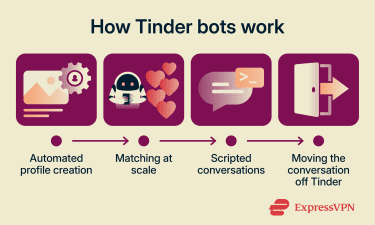
Scripted conversations
Once a match is made, the bot automatically sends a pre-scripted message, often within seconds. While many bots use simple, repetitive scripts, modern ones incorporate AI tools like ChatGPT to create more convincing, human-like conversations.
The pivot
After a few exchanges, most Tinder bots shift gear. The conversation stops developing and moves to the primary objective, which is to move the conversation off Tinder to a scam site, a paid service, or to steal personal data. They may also ask to move the conversation to a messaging app. This happens because Tinder monitors messages and behavior, whereas external platforms such as WhatsApp and Telegram are harder to moderate.
How to spot a Tinder bot
Most bots follow a recognizable pattern. Here's what a typical bot exchange looks like.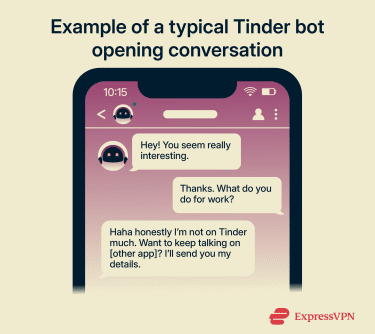
That escalation, the flattery, vague deflection, and immediate off-platform push are the fingerprints. The signs below are all expressions of that same sequence.
Instant reply after matching
This speed is one of the clearest early signals, because a real person likely hasn't had time to look at your profile or think about what to say.
However, matching and receiving a message within seconds doesn't automatically mean that you're talking to a bot. Some people do reply quickly. But when the message is generic or arrives at 3am, the combination is a stronger signal.
Generic, interchangeable messages
Nothing in the message references anything specific to you. There's no acknowledgement of your photos, your bio, or anything you've written. The replies are warm and vague: friendly enough to seem like a conversation, but broad enough to work on anyone. That's because they were written to work on anyone.
The opening messages are designed to catch your attention and create momentum quickly. Common tactics include:
- Flattery: "I'm so glad we matched. You seem really different from most people on here."
- Urgency: "I don't check Tinder much. Do you want to swap numbers?"
- False familiarity: "You look really familiar. Did we meet at [event]?" or "Do you know [name]?
- Local references: Some bots reference local places or events to make the conversation feel more believable and create a false sense of shared experiences.
The replies don't track the conversation
Ask something specific, and the response doesn't quite fit. If you ignore what they just said and send something unrelated, a bot often won't notice. Some don't adapt at all; others are slightly better at mimicking flow but still don't match the natural back-and-forth rhythm of a real chat.
A useful test is to reply with something completely nonsensical, for example, a random string of letters, a made-up word, or a statement that makes no sense in the context. A Tinder bot will often reply as if it were a normal message. A real person would react differently.
The push to move off Tinder
This is one of the most common patterns across all Tinder bots. Within a few exchanges, they'll try to move the conversation off Tinder, usually to WhatsApp or Telegram. They may also send a link to an external site with a comment like, "You've got to look at this." These may lead to fake login pages, subscription traps, or data harvesting forms.
If someone you just matched with is already asking to move the conversation elsewhere, treat it as a red flag, regardless of how normal everything else has seemed.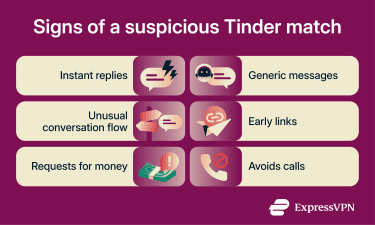
Requests for money
It doesn't always happen immediately, but any conversation with someone you've just met that turns to money is a serious warning sign.
If the topic does arise, it's often framed around a problem, for example, an emergency, being unable to access their funds, or an urgent expense they're embarrassed about.
Sometimes it's an "opportunity," like an investment, a platform to sign up for, or a subscription that will unlock something.
Suspicious photos
Photos can tell you a lot about a person. They also contain clues as to whether you're chatting to a bot. Here are a few things to look out for:
- Too polished: Every photo looks professionally lit and produced or would be more at home in a magazine campaign rather than a personal dating profile.
- Too few: There are only a couple of photos, often taken from a distance or from an angle that doesn't show the face clearly.
- Inconsistencies: The photos don't quite match each other in setting, age, or style, suggesting they were pulled from different sources.
Avoids calls or meetings
Bots can't do video calls or real-time interaction.
If someone keeps avoiding a video call, a quick voice note, or a meeting in person after you've been chatting for a while, saying they're too busy right now or their camera is broken, without following through, take note.
Real people eventually agree to a quick call if they're genuinely interested.
Are Tinder bots dangerous?
Yes, because they're often the entry point to larger scams.
Phishing and credential theft
Bots often send links to fake login pages that resemble platforms you recognize. When you enter your details, your credentials go straight to whoever set up the bot.
In other cases, these pages might enroll you in expensive subscriptions or bombard you with intrusive advertising, often without you realizing what happened until much later.
Financial scams
According to the annual FBI report on internet crime, romance and confidence scams cost Americans $929.3 million in 2025.
Many Tinder bots are designed to move quickly, using just enough conversation to lower your guard before steering the interaction toward a request for money. The framing might be an investment, an urgent personal crisis, or an unexpected expense like a broken-down car.
Once you've engaged, the bot may try to push you off Tinder and onto a messaging app, where a human scammer sometimes takes over to build trust and tailor the deception. This move is designed to avoid Tinder's automated security and reporting systems.
Once you're off Tinder, the platform's protections no longer apply, and it's harder to flag the account.
Personal data harvesting
Some bots are designed specifically to collect information and ask many personal questions, such as where you live, your phone number, where you work, past relationships, and your financial situation. In return, you don't learn anything about them.
In other cases, they may route you to a fake registration page where anything you enter is captured. Depending on what you share, this can provide enough detail to take over other accounts or commit identity theft.
Malware distribution
These scams are less common but still worth knowing about. Some matches may ask you to download a file or app, which can contain malicious software such as adware or Trojans. Another example is keyloggers, which can record everything you type, potentially exposing login credentials or financial details.
Treat a request to install anything from someone you've just matched with as a warning sign. The download may give them access to your contacts, messages, login details, or anything else you have stored on your device.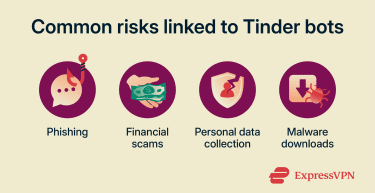
How to protect yourself from Tinder bots
Avoiding Tinder bots and staying safe on dating apps in general comes down to a few simple habits.
Don't click links from new matches
Regardless of how a link is framed, whether as a photo album, a profile, a verification step, or something to check out, don't click it until you have a good reason to trust who you're talking to.
Once you leave Tinder, the platform's protections no longer apply.
Reverse-image-search profile photos
If something about the photos feels off, run them through Google Images. Take a screenshot of your match's picture and upload it. Google then searches the internet for similar photos.
A genuine profile photo rarely turns up on stock image sites or is attached to multiple different names on other platforms. One that does is unlikely to have been taken for the profile you're looking at.
Test the conversation
Rather than ask generic questions, try something specific, for example, a direct reference to something in your profile, a question that requires a bit of thought, or something unexpected that's unrelated to the conversation. Real people adapt; Tinder bots work from a script that has limits.
If the replies start feeling disconnected or repetitive, stop engaging.
Keep personal and financial details private
Don't share your phone number, home address, workplace, or anything financial with someone you haven't verified. If money comes up in any form, stop engaging and report the account.
Look for the Photo Verified badge
Tinder's verification system now operates on three levels:
- Photo Verification: An optional process where you take a video selfie that Tinder checks for liveness, confirming that it hasn't been digitally altered and it matches your profile photo. It also helps detect fake profiles that use your photo.
- Photo Check: Is triggered automatically when Tinder's safety systems detect unusual activity on an account. The user is then asked to complete the same video selfie process before they can continue using the app.
- Face Check: Now mandatory for new users across a growing number of countries, Face Check requires a video selfie that Tinder checks against profile photos and also scans for duplicate faces across accounts, making it harder to run multiple fake profiles using the same images.
Passing any of these checks gets you a blue "Photo Verified" badge. However, while it's a useful indicator, it's not a guarantee of safety. A verified user can still behave deceptively. Use it as one factor among several.
Report and block suspicious accounts
Use the report option in the chat or profile screen. Blocking stops the conversation, and reporting flags the account for Tinder's moderation team.
User reports are one of the core methods Tinder's detection systems use to identify fraudulent accounts that automated checks missed.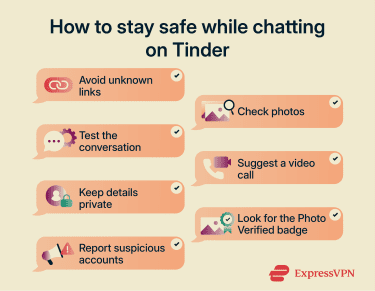
How Tinder tries to remove bots
Tinder uses a combination of verification tools, automated systems, and user reporting to help detect and keep bots off the platform:
- Conversation analysis: Applies natural language processing to detect scripted messages, suspicious keywords, and content that matches known scam patterns.
- Registration pattern analysis: The system monitors the speed and volume of registrations, flagging automated or bulk account creation.
- Mandatory Face Check: Face Check is mandatory in some regions where Tinder has rolled it out, including Canada, Australia, the U.K., and parts of the U.S., with expansion continuing. Tinder uses it to ensure the user is a real person and that their facial geometry does not match known banned or existing bot profiles.
- Data masking: Tinder stores encrypted "face maps" (not actual photos) to identify if a single person is attempting to operate multiple accounts.
- User reports: Feed into the system continuously, flagging accounts that have passed initial checks but have been identified by real users.
No system catches everything. Bot operators adapt when detection methods improve, and new accounts replace banned ones. But the combination of these tools, particularly mandatory Face Check in the regions where it's active, have measurably reduced the number of bots users encounter.
FAQ
Can a verified Tinder profile still be fake?
Why do Tinder bots ask to move to WhatsApp or Telegram?
Can Tinder bots use AI to seem more convincing?
Can clicking a bot link expose my data?
How common are Tinder bots?