 Celebrate with up to 80% off
VPC vs. VPN: What each one does, and when you need both


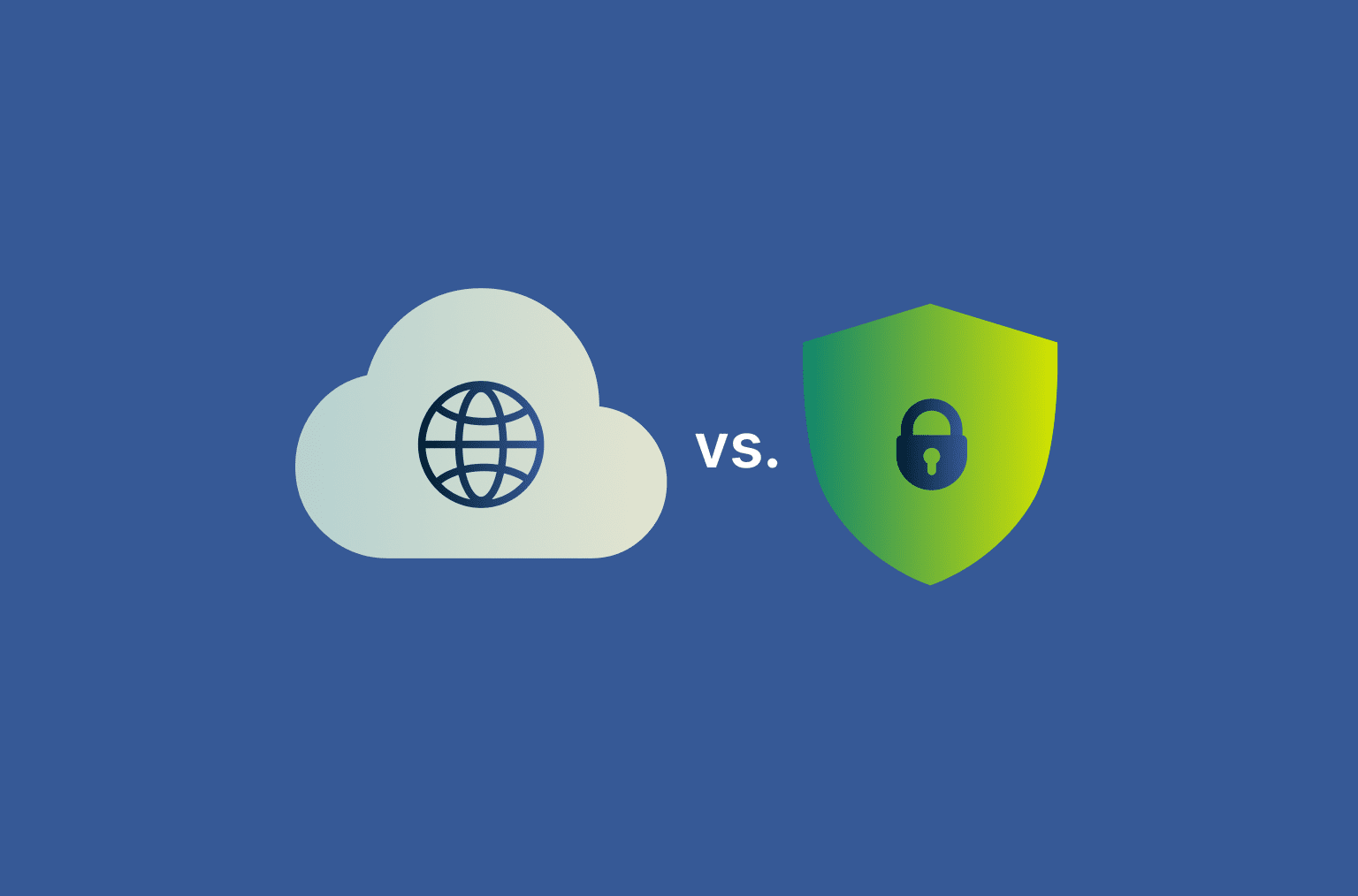
Virtual private clouds (VPCs) and virtual private networks (VPNs) are often confused. The names sound similar, and they both come up when you're thinking about cloud security. But they answer entirely different questions.
A VPC answers, "Where do my systems live?" A VPN answers, "How do users and networks reach them safely?" One is a place. The other is a tunnel into that place.
If you use a VPN when you, in fact, need a VPC, you won't get the network isolation and control needed to run cloud infrastructure securely. If you rely on a VPC without secure remote access, your systems may be exposed when employees or offices connect from outside the network.
Note: This article focuses on enterprise remote access VPNs, which differ from consumer VPN services designed for individual use, such as ExpressVPN.
What is a virtual private cloud (VPC)?
A VPC is a private, logically isolated section inside a public cloud. It gives you a place to run applications, databases, and services with control over how systems communicate and who can access them.
Cloud providers like Amazon Web Services (AWS), Microsoft Azure, and Google Cloud all offer versions of this concept. AWS calls it a VPC, Azure uses the term Virtual Network (VNet), and Google Cloud refers to VPC networks, but the idea is largely the same.
Think of a public cloud as a giant office building. Your VPC is your own suite inside it: you decide who gets a key or where the meeting rooms are. The plumbing and the elevators (the underlying hardware) are shared with the rest of the building.
How does a VPC work?
With a VPC, you don't manage the physical hardware yourself. The cloud provider handles the servers, storage, and networking underneath. Inside your VPC, you decide:
- The IP address range: When you create a VPC, you assign it a private IP address range called a Classless Inter-Domain Routing (CIDR) block. These addresses are used internally within your network and aren't directly routable over the public internet.
- How that range is split into subnets: Public subnets for things the world should reach, like your front-end web servers. Private subnets for things it shouldn't, such as databases and internal services.
- Which traffic is allowed where: This is mostly done with security groups (firewalls that wrap each resource) and network access control lists (broader rules at the subnet level). These controls help define which systems can communicate with each other and what traffic should be blocked.
- How the VPC connects to the outside world: Via an internet gateway for public traffic, a Network Address Translation (NAT) gateway so private resources can reach out without being exposed, or VPC peering and Transit Gateway for connecting to other VPCs.
None of this needs physical hardware: the VPC is configured through the cloud provider's console or infrastructure-as-code tools.
The "private" in VPC means it's isolated from other tenants on the cloud provider. It doesn't mean your VPC is automatically inaccessible from the internet. Most VPCs running real applications have public-facing pieces (the bit that serves your website) and private-facing pieces (the bit that holds your database). You decide where the dividing line goes.
That isolation is one of the main reasons organizations use VPCs to run sensitive workloads in the cloud.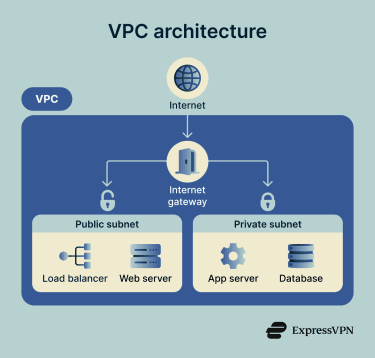
What is a virtual private network?
A VPN creates a secure connection over the internet. It protects data while it travels between devices, offices, or networks and helps prevent outsiders from intercepting or monitoring that traffic.
Depending on the setup, a VPN can:
- Secure a remote employee's connection to company systems.
- Connect office networks together.
- Protect internet traffic on public Wi-Fi.
- Allow users to access private systems remotely.
Unlike a VPC, a VPN does not create the network environment itself. It secures the path into or between networks.
How does a VPN work?
A VPN works by creating an encrypted tunnel between a device or network and a VPN server or a gateway. Two things happen when you connect:
- Your traffic is encrypted before it leaves your device: This makes it much harder for your internet service provider (ISP), public Wi-Fi operators, attackers on shared networks, or other third parties to inspect the contents of your traffic.
- Your IP address is masked: The VPN server is the one talking to the wider internet, not your device. Sites you visit see the VPN server's public IP address, not yours. This can improve privacy and make tracking more difficult.
Types of VPNs
There are two main types of VPNs, and they're designed for different use cases.
Remote access VPN
A remote access VPN connects one device to a private network. This is the type most people think of when they hear "VPN."
An employee working from home, for example, can open a VPN client on their laptop and securely connect to company systems.
Consumer VPN services work similarly, except the connection goes through the VPN provider's servers rather than a corporate network.
Common uses include:
- Remote work
- Secure browsing on public Wi-Fi
- Privacy protection
- Accessing internal company tools
Site-to-site VPN
A site-to-site VPN connects entire networks instead of individual devices.
Rather than employees manually connecting through an app, gateways such as routers or firewalls create encrypted tunnels between locations. For example:
- A branch office can connect securely to headquarters.
- A company's data center can connect to cloud infrastructure.
- Multiple office networks can operate as a single private environment.
Users usually don't notice the VPN itself because the connection happens automatically at the network level.
VPC vs. VPN: Key differences
VPCs and VPNs both deal with private networking, but they operate at different layers. A VPC defines the network environment where systems run. A VPN protects the traffic moving into, out of, or between those environments.
| VPC | VPN | |
| What it is | A private network you build inside a public cloud | An encrypted connection between two endpoints over an untrusted network |
| What it does | Holds your resources such as virtual machines, databases, and services; controls how they talk to each other and to the outside | Carries traffic safely from point A to point B |
| Lives where | Inside a cloud provider's infrastructure | Anywhere there's an internet connection or a private link between two points |
| Security model | Isolation and access control | Encryption and tunneling |
| Used by | Engineers, platform teams, and anyone running cloud infrastructure | Remote workers, branch offices, and individuals on public Wi-Fi |
When should you use a VPC?
You need a VPC whenever you're running infrastructure in the cloud. Here are some use cases.
Internal services that need to communicate with each other
Most apps are actually a stack of small services: authentication, billing, a data store, and some analytics. Putting them all in the same VPC means they communicate over private IP addresses, traffic stays inside the cloud provider's network, and you don't accidentally expose the database to the internet.
For example, a small Software-as-a-Service (SaaS) company might run its API, PostgreSQL database, and background workers in one VPC. The API is in a public subnet behind a load balancer; everything else is in private subnets and only reachable from the API.
Multiple environments without crosstalk
VPCs make it easier to separate systems based on risk and function.
Hosting production and staging in separate VPCs (or separate subnets within a VPC) means a bug in staging can't accidentally write to the production database.
Multi-region or hybrid architectures
VPC peering, Transit Gateway, AWS Cloud WAN, and Azure vNet peering: they all provide private connectivity but are used for different scales and topologies. They allow companies to connect multiple cloud regions, separate cloud accounts, on-premises systems, and disaster recovery environments without exposing internal data.
- VPC peering: A network connection that enables direct data communication between two separate VPC networks using private IP addresses. Servers and resources in two different networks can communicate securely as if they were connected through a private network.
- Transit Gateway: A cloud-based router that connects thousands of VPCs and on-premises networks from a central point in cloud infrastructures, especially in AWS environments. Greatly simplifies network management and routing.
- AWS Cloud WAN: A managed AWS service that lets you create, manage, and monitor your on-premises data centers, branches, and AWS VPCs as one centralized global network.
- Azure VNet peering: A networking feature that allows two or more separate virtual networks in Microsoft Azure to communicate securely and seamlessly as if they were connected through a private network.
When should you use a VPN?
A VPN is the right choice when you need to secure traffic between users, devices, offices, or networks.
Connecting an office (or data center) to the cloud
You've got a room full of servers down the hall, and you want them to talk to a cloud VPC without exposing anything to the internet. A site-to-site VPN does that: there's a gateway at each end and an encrypted tunnel between them. The traffic flows between the two environments as if they were on the same network.
For example, a retail company can connect its in-store systems to a cloud-based inventory platform, ensuring updates are transferred securely.
However, while excellent for privacy, a VPN's encryption and rerouting process over the public internet can create issues if you need real-time speed or high bandwidth for things like trading platforms or streaming high-quality videos. That's when you may need dedicated links, such as AWS Direct Connect, Azure ExpressRoute, or Google Cloud Interconnect. However, they cost more and take weeks to provision instead of minutes.
Remote employees accessing internal systems
This is the classic corporate remote access VPN use case. You log in at home, the VPN client builds a tunnel to the company network, and you can reach the internal HR app, the staging environment, or whatever you need. The network treats you as if you were sitting in the office.
However, enterprise VPNs are losing ground here, which we cover in the next section.
Sending sensitive data between networks
This can involve, for example, healthcare records moving between a clinic and a cloud platform or card data flowing between a payment processor and a merchant. In these cases, encryption in transit is often required or strongly expected under security and compliance frameworks. A VPN can help meet that need.
The shift to zero-trust network access
The traditional remote access VPN model is being replaced in many companies with zero-trust network access (ZTNA). Instead of giving someone access to your network and then trusting them once they're in, you give them access to specific applications, one at a time, and re-verify on each request.
Tools in this space include Cloudflare Access, Zscaler Private Access, Twingate, Tailscale, and Google's BeyondCorp. Most major analyst firms now treat ZTNA as the default recommendation for new remote-access deployments.
| Traditional remote access VPN | ZTNA | |
| Trust model | "You're in. Welcome to the network." | "Prove it again. For each app. Every time." |
| What you reach | The whole network | Only the specific apps you're cleared for |
| If credentials leak | An attacker can wander the network | Reduces the attacker's lateral movement and limits access to specific applications |
Two caveats. First, a VPN still applies to site-to-site connections, such as office-to-cloud, data-center-to-cloud, and branch-to-branch setups. ZTNA mainly replaces the user-to-network half of the picture, where employees need access to specific internal apps rather than the whole network.
Second, ZTNA isn't an upgrade. It's a different model that requires you to inventory your apps, integrate with your identity provider, and rethink access policies. Most companies adopt it gradually, application by application, while keeping the VPN running for legacy systems and network-to-network connections.
How a VPC and VPN work together
Here's a reference architecture that's probably familiar in most mid-sized SaaS companies:
- All production systems live in a VPC. The database and internal services are in private subnets, with no public IPs. Only the load balancer in front of the public-facing API is exposed.
- Engineers reaching production go through a VPN that lands them in the VPC. Their access is gated by single-sign-on (SSO) and multi-factor authentication (MFA), plus role-based rules. The on-call engineer can reach production, but the marketing team can't.
- The on-prem office is connected to the VPC via a site-to-site VPN, so anyone in the office can reach internal tools without each person setting up their own VPN client.
- For the data warehouse in another region, there's a VPC peering connection between the production VPC and the analytics VPC, so that data can be extracted without crossing the public internet.
The VPC provides network isolation, while the VPN controls secure access into that environment. Together, they create a layered defense in which each component serves a distinct purpose. Removing either layer weakens the overall security model, but neither layer is expected to provide complete protection on its own.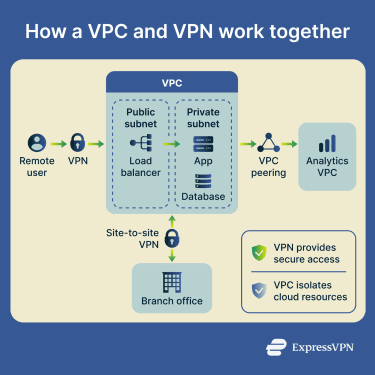
VPC vs. VPN: Which one is right for you?
A few simple questions can help you decide:
- Are you hosting systems or securing connections? If you're running applications, databases, or internal cloud services, you need a VPC. If you're securing how users or networks connect to those systems, you need a VPN.
- Is access from inside the same cloud or from outside? Inside the same cloud, services usually talk over the VPC's private network, and you don't need a VPN at all. "Outside" means a VPN, ZTNA, or dedicated link.
- What are your security or compliance requirements? Many regulations require both network isolation and encrypted access. In those cases, using a VPC and VPN together helps meet those requirements.
Here's a quick comparison.
| What you're trying to do | What you need |
| Host applications or databases in the cloud, only reachable internally | VPC only |
| Let employees reach internal cloud systems from home | VPC + VPN |
| Connect a head office to a branch or an office to the cloud | Site-to-site VPN |
| Run regulated workloads in the cloud | VPC + VPN |
FAQ
Can a VPN connect to a VPC?
Is a VPC only used in cloud environments?
Which option is better for remote employees?
Which is more secure, a VPC or a VPN?
If you have to pick one, pick the one that addresses your actual risk. Tenants seeing your data: VPC. Attackers intercepting traffic: VPN. Most real-world environments need both, plus a few other things (identity, monitoring, and encryption at rest).