 Celebrate with up to 80% off
How reputation management can help you stay private



Information connected to a person's name can spread quickly across search engines, social platforms, forums, and public records. A single post, photo, review, or outdated listing can influence how others perceive someone online long after it was published. As personal information becomes easier to search and share, more people are paying closer attention to their online presence and digital privacy.
What is online reputation management?
ORM is the ongoing process of monitoring, influencing, and improving how you or your organization appear online, across search results, social media, news coverage, review platforms, and professional directories. Your online reputation is the sum of what search engines and public platforms surface when someone looks you up, and ORM is the practice of shaping what that picture looks like.
ORM is distinct from data protection tools, which work by limiting what information becomes visible in the first place, for instance, by restricting app permissions or removing personal data from broker databases. ORM works on information that is already publicly accessible, focusing on how that information is perceived and what appears most prominently when people search for you.
Why online reputation management matters
Information associated with your name can reveal personal details and influence decisions about you before you ever get a chance to respond.
What people see when they search your name
When you enter your name into a search engine, you might find personal details such as past and current addresses, aliases, linked social media accounts, and even family members' names. This information may come from content you deliberately posted, people-search sites, public records, old profiles, and other indexed material tied to your name.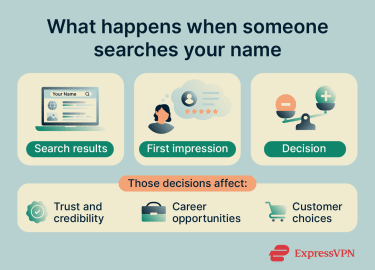
How it affects trust and credibility
Online reputation shapes how people assess you before any direct interaction. For individuals, this means anyone (from friends and prospective partners to employers and clients) can form a judgment based on what they find.
For organizations, the stakes can be higher: reputation directly influences customer decisions, investor confidence, and how potential employees perceive a company. According to Willis Towers Watson's (WTW) 2024/25 Global Reputational Risk Readiness Survey of 500 senior executives worldwide, 86% of organizations have a formal process for assessing and managing reputational risks. The survey also notes a shift toward treating reputation as a strategic risk rather than only a branding concern.
Part of what makes this consequential is how quickly perception can shift. Positive or negative content spreads fast across platforms, and the window to respond before an impression solidifies is often narrow.
Impact on personal and professional opportunities
Hiring is one of the most documented areas where online reputation has a measurable impact. According to a 2023 survey by Resume Builder (a job-search resource company) of over 1,000 employees in hiring-decision roles, 74% check candidates' social media as part of the evaluation process, and 57% of those who do so review candidates' social media before the interview. Of those who screen candidates this way, 85% say they have passed on a candidate based on information they found.
Consumer behavior tells a similar story. According to PowerReviews' 2023 consumer survey, 99.75% of online shoppers read reviews before making a purchase, meaning that, for businesses, clusters of negative reviews or an unmanaged online presence can influence purchase decisions early in the customer journey.
How ORM works
ORM is not a one-time fix. It requires ongoing monitoring, content management, and deliberate engagement to shape how you or your organization appear online over time.
Monitoring your online presence
Effective ORM starts with listening. Regularly reviewing feedback across search results, social media, review platforms, and news sources helps individuals and organizations catch emerging patterns before they escalate. It also surfaces outdated or inaccurate information that might otherwise go unaddressed.
In practice, this means searching for your name and known aliases and reviewing which pages and platforms appear in results. It also means using tools such as search alerts, social listening platforms, or review-monitoring services to track mentions of your usernames, email addresses, or brand names across the web.
Managing reviews and public feedback
Public reviews are a significant part of online reputation for organizations, professionals, and other public-facing individuals. They frequently appear near the top of search results and often form a first impression before any direct contact takes place.
A pattern of negative, unanswered, or misleading reviews can make someone seem unreliable even when the context is missing. However, the opposite extreme carries its own risk: over-responding to every critical comment can come across as defensive, and a profile with no negative feedback at all tends to raise suspicion.
A study from Northwestern University's Spiegel Research Center found that purchase likelihood actually peaks at ratings between 4.2 and 4.5 stars (not at a perfect 5.0) because some consumers see an unblemished record as "too-good-to-be-true."
Managing reviews effectively means focusing on what matters: correcting false or outdated information and acknowledging legitimate concerns with a clear, measured response. A well-handled reply can reduce the impact of negative comments and give future readers a more balanced picture.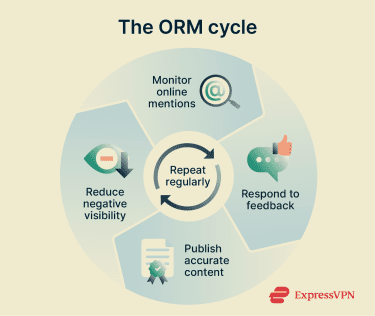
Publishing and promoting relevant content
Proactively publishing accurate, relevant content is one of the most effective long-term ORM strategies. Blog posts, portfolio websites, and professional profiles provide search engines with accurate, up-to-date content to crawl and index, making it more likely that positive, relevant results appear before negative or outdated ones.
Engaging authentically with audiences through this content reinforces credibility. That said, visibility should always be weighed against privacy: publishing more content means sharing more information, so it's worth being deliberate about what personal details are included and which audiences can see them.
Also read: What is personally identifiable information (PII)? A guide to protecting sensitive data.
How to monitor your online reputation effectively
Monitoring your online reputation is manageable when broken into clear, repeatable steps. New information can appear at any time, so consistency matters more than effort.
Checking search results for your name
To check what appears when you search for yourself online, follow these steps:
- Search with less personalization: Open an incognito or private browsing window to reduce the effect of search history and cookies on results. Type your full name, common aliases, and usernames into search engines and note what appears first.
- Look beyond the first page: Scroll through multiple pages to surface older or less prominent results. Check name variations, such as with and without middle initials.
- Record what you find: Note the URLs and platforms where your name appears, including social networks and people-search sites, so you have a complete reference to work from.
- Repeat regularly: Set a recurring reminder to redo these searches. Catching new mentions early gives you more time to respond before they gain visibility.
Learn more: How to deep search yourself and remove personal data from the web.
Tracking mentions across websites and social platforms
Simple name searches only show part of the picture. To get a fuller view of your online presence:
- Use search operators: Use quotation marks (for exact phrases) or site: (to search within a specific domain) to surface references that standard searches might miss.
- Set up alerts: Google Alerts is a free tool that notifies you by email when your name or chosen keywords appear in new indexed content. Configure alerts for your name, aliases, and any usernames you use regularly.
- Check public profiles and forums: Audit your social media accounts and public forum activity for tags, comments, or mentions you may have overlooked.
Identifying false, outdated, or sensitive information
Once you have a clear picture of what is out there, the next step is evaluating what needs attention:
- Verify facts: When you encounter questionable information, compare it against official sources or personal records. Distinguish between factual criticism and false claims before deciding how to respond.
- Assess relevance: Determine whether the information is outdated. Old addresses, former employers, or superseded details often persist on data broker sites long after they're no longer accurate.
- Consider harm: Prioritize content that poses a concrete risk, such as exposed contact details or false claims that may be defamatory, over content that is merely unflattering.
- Document sources: Keep a record of where false or sensitive information appears. These records will be useful when requesting corrections or removals later.
What to do when your reputation takes a hit
Negative content or misinformation requires a careful, measured response; reacting hastily can make a situation worse.
Note: This information is for general educational purposes and not legal advice.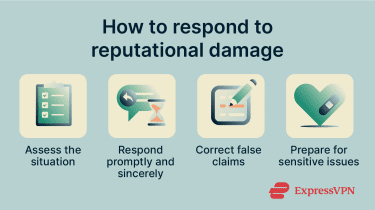
Responding quickly and thoughtfully
The scale of ORM differs between individuals and organizations. Organizations typically need formal processes, dedicated response owners, and consistent monitoring across multiple platforms. Individuals face this less often, but the same principles apply when something does arise. In either case:
- Research the context: Before responding, investigate what happened and whether any corrective action is warranted.
- Prioritize damaging content: Address feedback that is false, harmful, or widely visible before moving on to less critical items.
- Craft a sincere response: Acknowledge the concern, apologize where appropriate, and explain concretely what steps have been or will be taken. Authentic responses do more to rebuild trust than generic ones.
- Respond promptly: Aim to reply quickly where possible. A timely, personalized response can show that the concern was taken seriously and may encourage the reviewer to update their feedback.
Correcting misinformation
When correcting false information, lead with accurate facts rather than repeating the false claim, as restating misinformation, even to dispute it, can reinforce it in readers' minds. Provide evidence or a link to authoritative sources to support the correction.
If misinformation appears in a review or public comment, acknowledge the post, respectfully correct the inaccuracy, and keep the focus on what is true. Not every false claim warrants a response: content designed to provoke a reaction can spread further if engaged with, so assess whether responding adds clarity or only amplifies the problem.
Planning for sensitive or high-impact situations
Serious situations, such as public accusations, legal disputes, or personal crises, require preparation because unclear or poorly timed comments can escalate the situation.
Develop a basic crisis plan that identifies who is responsible for responding, which channels to use, and what the approval process looks like before anything is published. For organizations, this should be documented and tested before it's needed.
For situations involving defamation or other legal rights, consult an attorney, particularly if standard platform reporting processes have not resolved the issue or if the content poses a risk to your livelihood or personal safety.
How ORM relates to online privacy
Managing your online reputation and protecting your privacy are closely connected: both shape what others can find out about you, and actions taken in one area often support the other.
Reducing the visibility of personal information
Search results frequently surface personal details collected and published by data brokers, including contact details, addresses, and family members, often without your knowledge or consent. While ORM focuses on how existing information is perceived, reducing the volume of publicly accessible data directly supports that goal: less available information means fewer unwanted results to manage.
Also read: How to delete yourself from the internet (complete step-by-step guide).
Taking control of your digital footprint
Your digital footprint (the data trail you leave online) has two components. Your active footprint consists of what you deliberately share: social media posts, reviews, form submissions, and similar intentional actions. Your passive footprint is assembled without your direct input, using IP addresses, cookies, location data, and other information collected by websites and apps in the background.
ORM works across both auditing and pruning your active footprint through profile reviews and the deletion of old accounts, while privacy tools such as virtual private networks (VPNs) and tracker blockers limit how easily your passive footprint can be linked back to your identity.
ExpressVPN's Threat Manager blocks known trackers and malicious domains and helps stop apps from sending behavioral data to third-party trackers.
Limiting the spread of harmful content
Reducing the reach of damaging or sensitive content serves both reputational and safety goals. Though it's effectively impossible to scrub every trace of information once it's online, keeping personal contact details, location information, and other sensitive data out of easily searchable results can reduce exposure to threats such as phishing, stalking, and identity theft.
Securing accounts tied to your public identity is equally important: unauthorized access to an email or social media account can expose private data or lead to content being published under your name, both of which can cause lasting reputational damage.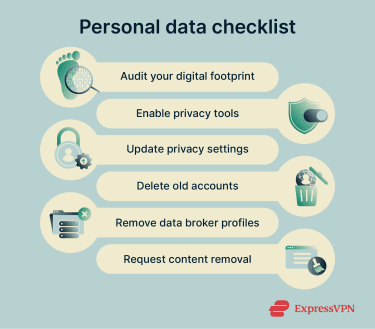
Other ways to control your personal information online
Beyond reputation management, there are concrete steps you can take to reduce your digital footprint and limit how much personal data is publicly accessible.
Updating privacy settings on major platforms
Audit both active and dormant social media and forum accounts. To surface old accounts you may have forgotten, search your email inbox for registration confirmations or use a service like JustDeleteMe, which provides direct links to the deletion or deactivation pages of hundreds of platforms.
For each account you keep, review the privacy settings and limit public visibility where possible. As a general principle, personal profiles are better kept private, while professional networks (such as LinkedIn) can reasonably remain public, with sensitive details hidden where appropriate. Ensure each account uses a unique, strong password. The Federal Trade Commission (FTC) also recommends two-factor authentication (2FA) for stronger account protection.
Removing data from people-search websites
People-search sites compile addresses, phone numbers, and other details from public records and other sources, then sell access to that information. You can request removal from these sites directly, but the process varies by platform, can be time-consuming, and often requires repeated requests as data reappears.
Opt-out lists can assist with this, but be cautious of services that charge high fees or make unrealistic guarantees.
For a more automated approach, ExpressVPN's Data Removal service handles the process on your behalf: you provide a few lines of personal information, and the service contacts data broker sites and monitors for reappearances. Note that Data Removal is part of ExpressVPN's Identity Defender suite and is currently available only in the U.S., on Advanced and Express Pro plans.
Requesting content removal where possible
If personal information appears online, start by contacting whoever controls the page. Provide the exact URL and a clear explanation of why the content should be removed. Note that search engine removal tools, such as Google's free Results about you tool, only remove results from Google Search; the underlying content remains on the original website unless the site owner takes it down separately.
Learn more: Google's personal data removal tools: What they are and how to use them.
Whether removal is possible at all depends on jurisdiction and context. In the EU, Article 17 of the General Data Protection Regulation (GDPR) gives individuals the right to request erasure of personal data in certain circumstances. For example, when the data is no longer needed for its original purpose, or after consent has been withdrawn. However, the right doesn't apply where keeping the information is necessary for freedom of expression, a legal obligation, public interest reasons, or other protected legal purposes.
In the U.S., removal rights are more fragmented. The Children's Online Privacy Protection Act (COPPA) gives parents the right to request deletion of a child's personal data from covered online services, such as child-directed services that collect personal information from children under 13. At the state level, California's Consumer Privacy Act (CCPA) allows California residents to request deletion of personal information collected by covered businesses, with some exceptions.
Limiting what you share going forward
The simplest long-term measure is being deliberate about what you share in the first place. Make personal social media accounts private, control who can follow you, delete accounts you no longer use, and decline non-essential cookies when prompted, while recognizing that sites and apps may still use other tracking methods.
For organizations, ensure that only authorized personnel have access to official accounts and protect them with strong authentication. An employee posting sensitive or off-message content can cause significant reputational damage. Access controls, multi-factor authentication (MFA), and clear social media policies reduce that risk.
Also read: How to make your Facebook account private.
FAQ
Can reputation management remove harmful content?
How long does it take to improve my online reputation?
Is reputation management legal?
Can I do reputation management on my own?
What should I do if false information appears online?