Expressvpn Glossary
Network virtualization

What is network virtualization?
Network virtualization is the process of creating software-defined networks that operate independently of the underlying physical infrastructure.
Instead of configuring each switch and router individually, administrators define and manage networks centrally. The hardware still forwards traffic, but software controls how it flows between devices, applications, and users.
How does network virtualization work?
Network virtualization adds a software layer between physical hardware and the services running on it.
Virtual switches and routers manage traffic, while tunneling protocols such as Virtual eXtensible Local Area Networks (VXLANs) and Generic Network Virtualization Encapsulation (Geneve) create overlay networks that carry data across the physical infrastructure. In many deployments, centralized controllers or orchestration platforms automate forwarding rules and policy enforcement.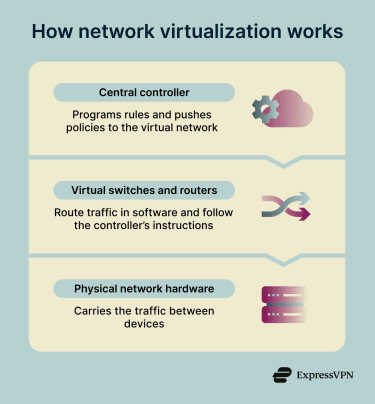 Network virtualization can use tags, identities, and policies to support microsegmentation, keeping traffic separated. This ensures each virtual network, tenant, or workload remains isolated, even when sharing the same physical infrastructure.
Types of network virtualization
Common types of network virtualization include:
- Virtual local area network (VLAN)-based segmentation: Divides a physical network into isolated Layer 2 segments. Devices within the same VLAN communicate directly, while traffic between VLANs requires routing.
- VXLAN or Geneve overlay networks: Use tunneling to create scalable virtual networks across large environments, often in data centers and cloud infrastructure.
- Virtual routing and forwarding (VRF): Enables multiple routing tables within a single router, keeping traffic paths separate without extra hardware.
- Network function virtualization (NFV): Replaces hardware appliances like firewalls and load balancers with software running on standard servers.
- Microsegmentation: Applies granular policies at the workload or application level, enabling precise traffic control and supporting zero-trust network models.
Why is network virtualization important?
Network virtualization reduces the limitations of hardware-based networking by enabling centralized, software-driven control.
By dividing infrastructure into isolated segments, it can also limit how far a threat spreads after a breach. Security policies can be updated across the network, too, without relying on hardware changes.
It also reduces dependence on specialized hardware, making it easier to scale infrastructure and support multi-tenant environments.
Where is network virtualization used?
Network virtualization is used across a wide range of environments, including:
- Data centers and private clouds.
- Public cloud networks.
- Enterprise branch networks.
- Containerized platforms.
- Development and testing environments.
Benefits, limitations, and risks
Network virtualization offers various benefits, but it also comes with certain limitations and risks.
Benefits include:
- Faster deployment and scaling: Virtual networks can be created and extended across data centers, cloud environments, and branch locations without changing physical infrastructure.
- Centralized management: Security policies and segmentation rules can be applied consistently from a single control point.
- Improved isolation: Segmentation can limit how far threats spread within a network.
Limitations and risks include:
- Misconfiguration: Incorrect setups can expose internal services if policies are not applied carefully.
- Performance overhead: Tunneling protocols can add latency, especially in high-traffic environments.
- Visibility gaps: East-west traffic between workloads can be harder to monitor without the right tools.
- Controller compromise: If the central controller is breached, attackers may gain broad network access.
- Metadata exposure: Monitoring data can reveal network structure if not properly secured.
- Delayed patching: Software-based network functions must be updated regularly to avoid known vulnerabilities.
Further reading
- Network architecture: Building secure and modern networks
- SD-WAN vs. VPN: Which is the right choice for your business?
- Virtual server vs. physical server: Key differences explained
- How to implement zero trust
- The 7 pillars of zero-trust security
- Zero-trust network access (ZTNA) explained